Showing posts with label learning. Show all posts

Wednesday, February 11, 2015

Hamilton, NZ Keynote

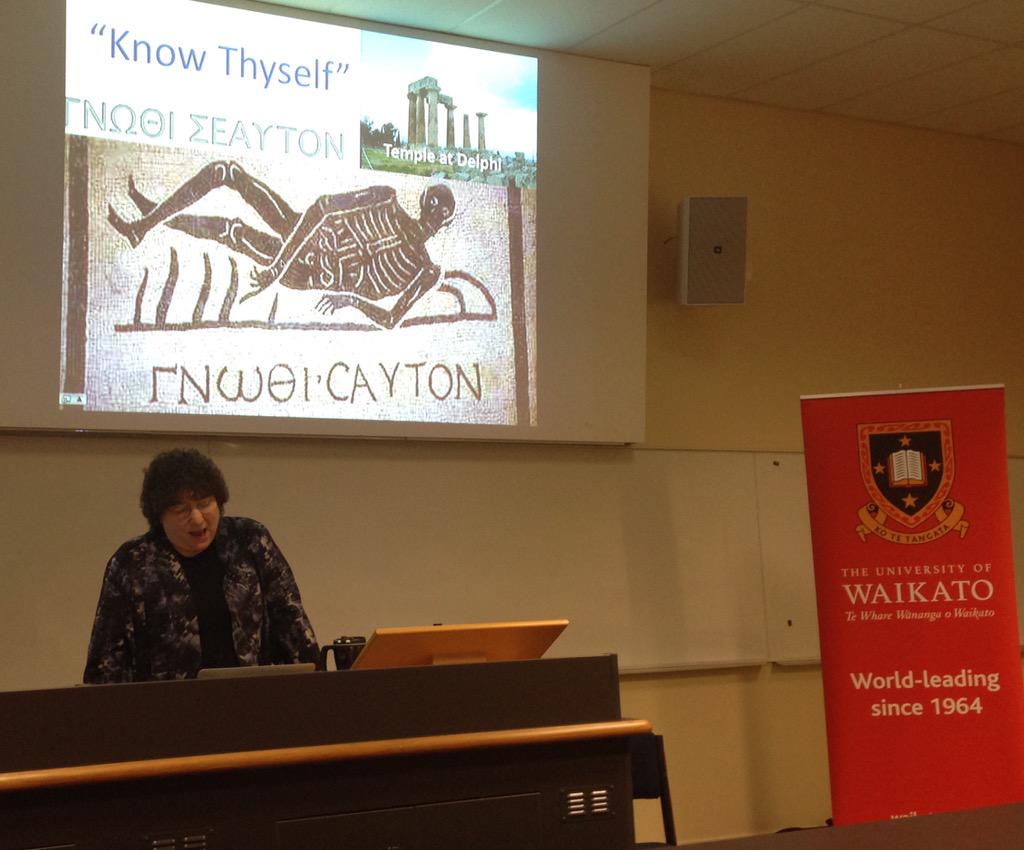
I am in Hamilton, New Zealand, presenting the keynote address at WCELfest2015. These are a great group of educators and it has been fun to share my ideas and see what they are doing with both ePortfolios and digital storytelling. Here are my slides:

It is fun to follow my Twitter feed of comments. Here is a sample and a few images:
  • tracey morgan ‏@traceymorgan
    encouraging students to be creative taking on a persona and telling stories #wcelfest
  • Nigel Robertson ‏@easegill 36m36 minutes ago
    Helen Barrett @eportfolios reflecting on the road taken. Her journey of choices in a digital story #WCELfest
  • Ursula ‏@UrsulaEdg 38m38 minutes ago
    @eportfolios great keynote #wcelfest thank you! #storytelling #elearning
  • Anne Robertson ‏@robeanne 40m40 minutes ago Hamilton City, New Zealand
    https://aboxofthistles.wordpress.com/2015/02/11/28daysofwriting-day-10-digital-story-telling/ … my first attempt at a digital story #wcelfest #eportfolios @eportfolios thank you
  • tracey morgan ‏@traceymorgan 45m45 minutes ago
    The challenge what story will we tell #wcelfest
  • Kristina DC Hoeppner ‏@anitsirk 45m45 minutes ago
    #wcelfest helen barrett: reflections & relationships are the heart & soul of an ePortfolio and not the technology.
  • Teresa Gibbison ‏@gibbisons 46m46 minutes ago
        @eportfolios with an important reminder #wcelfest
  • Nigel Robertson ‏@easegill 46m46 minutes ago
    The heart and soul of a portfolio is the relationships, the conversations, the interactions #WCELfest @eportfolios
  • Dianne Forbes ‏@difo38 48m48 minutes ago
    Range of tools for capturing, reflecting, sharing, learning. We are spoiled for choice #WCELfest
  • Noeline Wright ‏@enrite 49m49 minutes ago
    @easegill @difo38 #wcelfest yes- article still being cited 4 yrs later. Must have been one of first in education
  • Anne Robertson ‏@robeanne 50m50 minutes ago Hamilton City, New Zealand
    Eportfolios or Mportfolios - capturing the learning moment using mobile devices. So powerful #eportfolios #wcelfest
  • Teresa Gibbison ‏@gibbisons 50m50 minutes ago
        @eportfolios mPortfolios site https://sites.google.com/site/mportfolios/ … #wcelfest
  • Dianne Forbes ‏@difo38 50m50 minutes ago
    The essence of reflection: here's what, so what, now what? #WCELfest
  • Stephen Harlow ‏@stephenharlow 51m51 minutes ago
    .@eportfolios remembering meeting @arrowbound & Janice McDrury, authors of Learning through #Storytelling: http://waikato.lconz.ac.nz/vwebv/holdingsInfo?bibId=393722 … #wcelfest
  • Dianne Forbes ‏@difo38 52m52 minutes ago
    mPortfolios - reflecting in the moment #WCELfest
  • tracey morgan ‏@traceymorgan 52m52 minutes ago
    Mobile the future of eportfolio capturing the moment of learning #wcelfest
  • K Gilliver-Brown ‏@kgilliver_brown 53m53 minutes ago
    #wcelfest Dr. Helen Barrett: Coming to the realisation that the journey is as important as the destination.
  • Nigel Robertson ‏@easegill 53m53 minutes ago
    “@robeanne Process is more important than the output, that is where the learning is #wcelfest” #waitalk
  • Nigel Robertson ‏@easegill 54m54 minutes ago
    The process is much more important than the product. #learning #WCELfest
  • Dianne Forbes ‏@difo38 54m54 minutes ago
    #WCELfest portfolios & stories help us to recognise impt themes & patterns, informing decisions
  • Anne Robertson ‏@robeanne 54m54 minutes ago Hamilton City, New Zealand
    Who learns more in the classroom? The teacher or the students? #wcelfest #eportfolios
  • Anne Robertson ‏@robeanne 55m55 minutes ago Hamilton City, New Zealand
    Process is more important than the output, that is where the learning is #wcelfest
  • Nigel Robertson ‏@easegill 56m56 minutes ago
    'Making the focus of my portfolio the reality of my existence' Finding purpose in life #WCELfest
  • Anne Robertson ‏@robeanne 56m56 minutes ago Hamilton City, New Zealand
    #wcelfest our students need to know why and how they are learning and where they are going. #eportfolios
  • Nigel Robertson ‏@easegill 58m58 minutes ago
    Stories, ours and others, shape our memories #digitalstorytelling #WCELfest
  • Anne Robertson ‏@robeanne 58m58 minutes ago Hamilton City, New Zealand
    Whole idea of learning through story telling is very powerful and exciting #digitalstorytelling #eportfolios #wcelfest
  • tracey morgan ‏@traceymorgan 59m59 minutes ago
    Reflection how we learn, hold on to our stories, giving us our sense of self #wcelfest
  • Dianne Forbes ‏@difo38 59m59 minutes ago
    #wcelfest Telling stories is a way to deeper learning
  • Nigel Robertson ‏@easegill 1h1 hour ago
    Portfolios should be persuasive #ePortfolios #WCELfest
  • Anne Robertson ‏@robeanne 1h1 hour ago Hamilton City, New Zealand
    Experiential learning and portfolios. Learning from reflecting on experiences #eportfolios #wcelfest
  • Teresa Gibbison ‏@gibbisons 1h1 hour ago
        “@traceymorgan: @gibbisons capturing the moments #wcelfest ” love this pic!
  • Teresa Gibbison ‏@gibbisons 1h1 hour ago
    @eportfolios Reflection4Learning Google Site https://sites.google.com/site/reflection4learning/Home … #wcelfest
  • tracey morgan ‏@traceymorgan 1h1 hour ago
    @gibbisons capturing the moments #wcelfest
  • Nigel Robertson ‏@easegill 1h1 hour ago
    Getting a shout out at #WCELfest is @cogdog and his elephant thanks to @eportfolios
  • Anne Robertson ‏@robeanne 1h1 hour ago Hamilton City, New Zealand
    Digital stories to promote memory recall for Alzheimer sufferers #wcelfest #eportfolios
  • Nigel Robertson ‏@easegill 1h1 hour ago
    Eportfolios as part of your digital identity. What do you find when you Google yourself? #WCELfest
  • Dianne Forbes ‏@difo38 1h1 hour ago
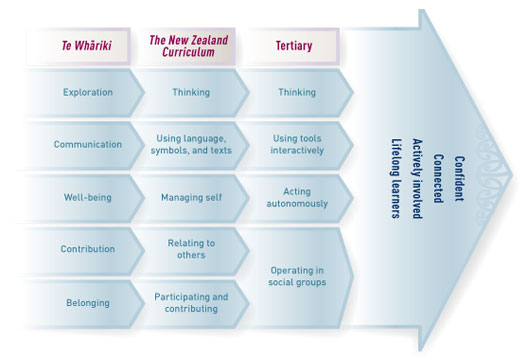
    wcelfest what starts as well-being evolves into managing self and then to acting autonomously http://nzcurriculum.tki.org.nz/var/tki-nzc/storage/images/media/images/kl-images/key-competencies-cross-sector-alignment/3717-1-eng-NZ/key-competencies-Cross-sector-alignment.jpg
  • Anne Robertson ‏@robeanne 1h1 hour ago Hamilton City, New Zealand
    Portfolios have to be formative not summative or it won't be student ownership or investment #wcelfest
  • Anne Robertson ‏@robeanne 1h1 hour ago Hamilton City, New Zealand
    Fascinating cultural study of parents who upload pictures of children on social media #eportfolios #lifelonglearning #wcelfest
  • tracey morgan ‏@traceymorgan 1h1 hour ago
    Scrapbooks of life experience activities of eportfolio #wcelfest
  • Teresa Gibbison ‏@gibbisons 1h1 hour ago
     @eportfolios URL #jisc Effective Practice with ePortfolios http://www.jisc.ac.uk/news/e-portfolios-tools-for-21st-century-learning-09-sep-2008 … #wcelfest
  • Nigel Robertson ‏@easegill 1h1 hour ago
    Students need continuous personal development and we must encourage and enable that. Universities are learning institutions #WCELfest
  • Anne Robertson ‏@robeanne 1h1 hour ago Hamilton City, New Zealand
    Eportfolios not just a storage space. A place for learners to find their voice #eportfolios #wcelfest
  • tracey morgan ‏@traceymorgan 1h1 hour ago
    Dialogue at the centre conversation of eportfolio #wcelfest
  • Anne Robertson ‏@robeanne 1h1 hour ago Hamilton City, New Zealand
    Eportfolios are laboratories where learners construct meaning #wcelfest
  • Dianne Forbes ‏@difo38 1h1 hour ago
    #wcelfest [people] who manage themselves are enterprising, resourceful, reliable, and resilient ... NZC 2007 http://nzcurriculum.tki.org.nz/The-New-Zealand-Curriculum/Key-competencies#M …
  • Nigel Robertson ‏@easegill 1h1 hour ago
    “@difo38 And of course self management is a key competency in the nz curriculum #wcelfest” And should be a graduate attribute #waitalk
  • tracey morgan ‏@traceymorgan 1h1 hour ago
    Students constructing meaning #wcelfest
  • Anne Robertson ‏@robeanne 1h1 hour ago Hamilton City, New Zealand
    Questions for forming personal growth portfolio to help recognise learningfrom Peter Drucker #eportfolio #wcelfest
  • Teresa Gibbison ‏@gibbisons 1h1 hour ago
        @eportfolios 'Know Thyself" #wcelfest
  • tracey morgan ‏@traceymorgan 1h1 hour ago
    Know thyself, life long learning, the magic of reflection via the portfolio #wcelfest
  • Anne Robertson ‏@robeanne 1h1 hour ago Hamilton City, New Zealand
    The starting point has to be the learner building self awareness and understanding #eportfolios #wcelfest
  • Dianne Forbes ‏@difo38 1h1 hour ago
    And of course self management is a key competency in the nz curriculum #wcelfest
  • Nigel Robertson ‏@easegill 1h1 hour ago
    Eportfolios are like the Blind Men and the Elephant. Stand back and understand the bigger picture of eportfolios #WCELfest
  • tracey morgan ‏@traceymorgan 1h1 hour ago
    Showcase, assestment, development, personal ownership #folio #wcelfest
  • Dianne Forbes ‏@difo38 1h1 hour ago
    Why? Depends on which part of the elephant we perceive #wcelfest Fundamentally about student choice & voice
  • Anne Robertson ‏@robeanne 1h1 hour ago Hamilton City, New Zealand
    Eportfolios for showcase, assessment and reflection. It is all that things #wcelfest just like the blind men and the elephant
  • Dianne Forbes ‏@difo38 1h1 hour ago
    Self, artifacts& reflection - digital storytelling and eportfolios with @eportfolios Helen Barrett #wcelfest
  • Nigel Robertson ‏@easegill 1h1 hour ago
    “@difo38 Making thinking visible, archive of evidence, multi-purpose, multi-tools #wcelfest” The multiple facets of eportfolios
  • Anne Robertson ‏@robeanne 1h1 hour ago Hamilton City, New Zealand
    Hear the learner's voice through digital stories in eportfolios #digitalstorytelling #eportfolios #wcelfest
  • Stephen Harlow ‏@stephenharlow 1h1 hour ago
    "#ePortfolios make thinking visible" @eportfolios @visiblelearning #wcelfest
  • tracey morgan ‏@traceymorgan 1h1 hour ago
    Hearing the learrners voice #wcelfest
  • Dianne Forbes ‏@difo38 1h1 hour ago
    Making thinking visible, archive of evidence, multi-purpose, multi-tools #wcelfest
  • Anne Robertson ‏@robeanne 1h1 hour ago Hamilton City, New Zealand
    Eportfolios and digital story telling go hand in hand. Possibilities for deep learning #eportfolios #wcelfest
  • Nigel Robertson ‏@easegill 1h1 hour ago
        Dr Helen Barrett delivering the #WCELfest keynote at Waikato University #WaiEvents
  • mel ‏@melchivers 2h2 hours ago
    Eportfolio as both a workspace and a showcase. #WCELfest
  • tracey morgan ‏@traceymorgan 2h2 hours ago
    Collecting of artifacts, leonardo, making Thinking visible #wcelfest
  • Anne Robertson ‏@robeanne 2h2 hours ago Hamilton City, New Zealand
    Portfolios make learning visible #wcelfest #eportfolios #davinci
  • Anne Robertson ‏@robeanne 2h2 hours ago Hamilton City, New Zealand
    A portfolio has a different meaning for every walk of life #wcelfest what does it mean to you?
  • Anne Robertson ‏@robeanne 2h2 hours ago Hamilton City, New Zealand
    Portfolios for lifelong learning for identity development #WCELFEST
  • Nigel Robertson ‏@easegill 2h2 hours ago
    Portfolios not just for students, teachers should use them too #WCELfest
  • Anne Robertson ‏@robeanne 2h2 hours ago Hamilton City, New Zealand
    Rewired rather than retired - love it! @eportfolios #wcelfest
  • Anne Robertson ‏@robeanne 2h2 hours ago Hamilton City, New Zealand
    Building stories for reflection through #eportfolios recognizing how much we have learned @eportfolios #wcelfest
  • tracey morgan ‏@traceymorgan 2h2 hours ago
    My hero helen barrett creates Google site #wcelfest
  • Stephen Harlow ‏@stephenharlow 2h2 hours ago
    .@eportfolios tuning up the #WCELfest audience @waikato with her keynote: Know Thyself: #ePortfolios & Reflective Stories of Deep Learning
  • tracey morgan ‏@traceymorgan 2h2 hours ago
    Dr Helen Barrett about to give us the lowdown on eportfolios & reflective stories #wcelfest


Tuesday, August 16, 2011

Google+ or Edmodo for online course support?

I am starting to develop the online courses for the REAL ePortfolio Academy for K-12 teachers, and I want to use tools that model strategies that K-12 teachers can use with their own students. While some are using Moodle, few are using Blackboard or many of the course management systems used in higher education. I found an interesting blog post on Selecting Appropriate Technology for Online Learning. The author used Bates and Poole’s SECTIONS model: Students, Ease of use, Costs, Teaching and learning, Interaction and interactivity, Organizational support, Novelty (newness), Speed. These are interesting factors to consider as I develop an environment to support collaboration in these online courses.

Last week, there was a very interesting Edmodocon, with educators from around the world presenting about the use of Edmodo in K-12 classrooms (recording now online). I used the tool several times this summer in workshops, and it has the look and feel of Facebook. I like the ability to set up private groups and sub-groups. From the online conference, I saw how teachers are using this environment for collaboration. The most interesting presentation was on Game-Based Learning and how to set up and award badges in Edmodo. The system keeps track of Students, Teacher Connections, Library Items and produces a Sharing Score. It would be easy to see the level of participation by individuals in a course.

I received my Google+ invitation in the first few days, but there wasn't a lot of activity for me to follow. I recently listened to a whole series of podcasts called, Google+ Today and I've also been following This Week in Google podcasts. I have set up my Circles (Friends, Family, Following, ADE, Ed Tech, ePortfolio Colleagues) and Sparks (android tablet, iOS, educational technology, reflection in learning, digital storytelling, electronic portfolios). I posted a question (about using Google+ as a tool to facilitate communication in an online class), and received some very interesting responses (notice the length and depth of the last response). I haven't tried Hangouts yet, but it looks like a really interesting alternative to Skype and Google Voice, especially with groups of 10. (I could care less about Games right now in Google+; I have enough games on my various devices to keep up my procrastination level!)

What about other social networking tools? A lot of schools block Facebook, and I am finding I prefer using that tool for personal networking with close friends and family. I also don't think Facebook has the tools for online courses (although they are adding Skype for one-to-one voice chats). My other favorite social tool is Twitter, but the 140 character limit, and the public nature of tweets, contributes to short conversations, but not to the rich dialogue that I experienced in my recent Google+ post. I find that Twitter is good for announcements and what Chris Betcher calls, "tiny bursts of learning." Until I started following Sparks in Google+, I was using Twitter instead of RSS feeds, to read what other people are reading and posting.

What are the differences between these tools? Edmodo is called "Safe Social Networking" that can be used in schools. Google+ restricts membership to those over 18. For that reason alone, I should focus my efforts on Edmodo... but I am intrigued by Hangouts: could they be used for collaborative discussions? It seems like a great way to create small, like-minded groups to support each other through the process of implementing ePortfolios. I want to be able to record these Hangouts, though, so I have more research to do.

Wednesday, July 13, 2011

ePIC Conference Keynote

Tweets from people attending the presentation:
  • @shojikajita "When cloud computing meets with Semantic Web: A new design for e-portfolio systems in the social media era" http://bit.ly/rtAbps #epic11
  • @isabellegonon #epic11 Helen Barrett : the future (of #eportfolio) is in the #cloud and in #mobile
  • @ljanegray #epic11 Helen Barretts philosophy for e-portfolios = authenticity, choice and voice.
  • @inicot #epic11 I'll certainly remember this piece of advice from Helen Barrett "Rewire, don't retire!"
  • @John_Pallister the #ePortfolio challenge is to make it the 'e'asy portfolio; the 'e'ssential portfolio and then go for learner 'e'ngagement #epic11
  • @isabellegonon #epic11 now I know what a #shoebox story is ! Thanks to Helen Barrett
  • @kirstie_C Great presentation from helen barratt. Epf as digital document of development. it's everywhere #epic11
  • @shojikajita Peter Drucker "Success in the knowledge economy comes to those who know themselves" in "Managing Oneself" #epic11
  • @donpresant #epic11 Helen Barrett: family photos, videos often start building digital identity before birth...ultrasound as #eportfolio artefact
  • @donpresant #epic11 Helen Barrett: 4 pillars are: self awareness, planning to learn, knowing how to learn, monitoring your learning
  • @shojikajita Isaac Asimov "The day you stop learning is the day you begin decayin." #epic11
  • @inicot #epic11 Helen Barrettt, "the matriarch of ePortfolios": Lifelong learning shouldn't be confused with lifelong schooling 
It was an interesting session. First there was Donald Clark, talking about his skeptical blog post about ePortfolios: 7 reasons why I don’t want my life in a shoebox. In some ways I agreed with him when he railed against the commercial ePortfolio tools and extolled the use of social software. But he made some generalized statements that did not match my experience or beliefs, especially about lifelong learners. I think this blog entry simplified a very complex process, and didn't recognize the importance of metacognition. Before my talk, Shane Sutherland talked about the design of Personal Learning Spaces, which was an interesting look at systems design.

Tuesday, May 24, 2011

REAL E-Portfolio Academy for K-12 Teachers

I found a name and developed a logo for my latest project. Every portfolio needs an adjective to describe its purpose.  REAL stands for Reflection, Engagement, and Assessment for Learning.

I blogged this title in 2005, and haven't had an opportunity to put it into practice until now. So, when I introduce a series on online courses this summer, they will be under the umbrella on an online academy -- more like a learning community, although there will be more structure than the average online community of practice.

I have received over 129 responses to my online form, so far. I am surprised with the number of inquiries from outside the U.S. To date, 60% of the respondents have already set up a GoogleApps for Education account, and 75% indicated interest in students using mobile devices to support e-portfolio development! Tomorrow I am visiting a school where 3rd-5th graders are using a few mobile devices and Evernote to capture their learning and share with their parents. Stay tuned!

Wednesday, March 30, 2011

The "Hook" at Pt. England School

I'm in New Zealand visiting Pt. England School in Auckland, where they are implementing Google Apps and Blogger and where they worked with hapara.com to develop a brand new Google add-on called Teacher Dashboard, a tool that provides a lot of support for a teacher managing a classroom full of student GoogleDocs accounts (and soon Google Sites and Blogger). On Tuesday night after school, I participated in a meeting of the school's "hackers": a group from the larger Auckland community who have gathered together (over food and beer) almost weekly over the last 18 months to support a systemic approach to implementing technology in the school cluster: http://www.manaiakalani.org/

This group began when the principal, Russell Burt, sent out an email: "Hackers wanted!" They have been working through all of the issues of implementation. On Tuesday night, they reworked their Design Principles: http://www.manaiakalani.org/home/design-guidelines. I was impressed with their vision for the project, and the "open source" nature of their development. This group of creative people came together to solve a problem...to take on a challenge, and the results are stunning!

There are plans to share the school's wifi throughout the entire school community, mostly on light poles (keep in mind, this is one of the poorest neighborhoods in Auckland, where there are few computers and little or no Internet access in homes). Observing the systemic approach as well as the implementation of netbooks for students beginning in Year 5 (9-10 year-olds) is also impressive; their parents will be paying NZ$15 a month for these netbooks which eventually will be going home with the students. The program plans to support these netbooks for only three years... they realize that the technology will be changing a lot, and the devices will need to be replaced!

I am observing classrooms where students are blogging using Blogger on a regular basis (http://www.ptengland.school.nz/index.php?family=1,451), even the Year 1 students (5 years old) have blog entries dictated to teachers in a class blog: http://pesyear1.blogspot.com/ (the students were so pleased when we commented on their posts).

If there is one thing I have learned in this school is that if you want the impressive gains that they have made in the poorest schools in Auckland (see their research report linked below), you need visionary leadership, a group of teachers that is willing to take on the challenges, but who are also well-supported with PD and equipment, and a "can-do" attitude. Every teacher has a Macbook and a netbook; in addition to the student netbooks, every classroom has at least five iMacs (of various vintages...I even saw some 10-year-old "jelly bean" iMacs in Year 1 classrooms). As you can see, this school cluster is a great example of what can be done with imagination, some extra funding, and leadership (can't emphasize it enough)! Thanks to fellow ADE Dorothy Burt and everyone at Pt. England School for making us feel so welcome!

Here is a link to their research reports: http://www.manaiakalani.org/research-1/2008---2010-report
Summary: The Project definitely provided a motivation for writing, an improvement in audience awareness and purpose and in presentation skills. Other school interventions also had an impact on literacy achievement; however the Project has provided a purpose and enthusiasm for literacy.
The students of Manaiakalani were provided with a “hook” (e-learning outcomes published in on-line spaces) which gave these decile 1 students a voice to be heard globally. Subsequently, participating in the Manaiakalani Project enhanced their literacy, engagement, oral language and presentation.
With the advent of netbooks in 2011, schools are starting on a new and innovative initiative that, with careful planning and implementation and adequate support and funding, could be the key to 21st century education in New Zealand.

Thursday, February 24, 2011

Passion, Self-Directed Learning and Total Talent Portfolios

10 Ways Technology Supports 21st Century Learners in Being Self Directed by Lisa Nielsen
New York educator and super-blogger Lisa Nielsen posted a very interesting blog post on the Technology & Learning Advisor Blog. As Lisa introduced her post, "Life in the 21st century provides a whole-new world of opportunities for self-directed, passion-driven, personalized learning." Here is a summary of her ten points. (I provided the details on one of the items, for obvious reasons!)
  1. Personal Learning Networks
  2. Tweet to Connect with Experts
  3. Skype an Expert
  4. Free Online Educational Resources
  5. Online Learning
  6. Authentic Publishing
  7. Use YouTube and iTunes to Learn Anything
  8. Passion (or talent) Profiles
  9. Develop Authentic Learning Portfolios When done write [sp] ePortfolios can be a powerful tool that not only helps remind students of all their accomplishments, but it also enables them to share these with the world.  In the 21st century, creating an ePortfolio is free and easy.  Student simply select a container (blog, wiki, website, Google site), decide how they’d like to organize it, and then post their work.  I strongly advise against using any paid for portfolio site.  It is important that students have ownership of their own work and that it can travel with them wherever they are.  When it comes to ePortfolios, Helen Barrett is the go-to person.  To learn more, visit her blog http://blog.helenbarrett.org where she shares fantastic ideas.  
  10. Empower Students to Assess and Learn Themselves 
I also loved her earlier blog post: Preparing Students for Success by Helping Them Discover and Develop Their Passions where she says:
The Total Talent Portfolio focuses on student strengths and "high-end learning" behaviors. Although the teacher serves as a guide in the portfolio review process, the ultimate goal of the Total Talent Portfolio is to create autonomy in students by turning control for the management of the portfolio over to them. Students visit their portfolios often updating the selection of items to be included, maintaining and regularly updating the portfolio, and setting personal goals by making decisions about items that they would like to include in the portfolio. Teachers use the Total Talent Portfolio as a means to differentiate instruction and effectively group students. The students love having a Total Talent Portfolio because they know it’s their personal roadmap to making their dreams come true, whatever they are.

The students use their Total Talent Portfolios to help them pursue engaging activities in areas of deep personal interest. When discovering and exploring passions is the objective few teachers find their student have short attention spans. In fact quite the opposite. These students know what it’s like to be in a flow (the mental state of operation in which a person in an activity is fully immersed in a feeling of energized focus, full involvement, and success in the process of the activity.) and how to do so for real purposes.
Dr. Renzulli's article, linked from this blog post, clearly articulates "A Plan for Identifying and Developing Gifts and Talents." I love it! THAT's what a learning portfolio should be all about!

Tuesday, October 05, 2010

Collaboration in Online Course

This fall I am again teaching an online graduate class for Seattle Pacific University, Issues and Advances in Educational Technology. Like last year, I am trying to use open/free tools that students could use with their own students. So, we are using delicious.com (to record and share weekly research of online resources related to the weekly theme), typewith.me (to collaboratively reflect on the links shared and the weekly theme), blogs maintained on wordpress.com (to reflect on the learning for the week and provide feedback), Google Sites (to develop a collaborative project), Google Docs (sharing documents for feedback, and forms/spreadheet for weekly grades), and one of the digital storytelling tools (to develop a digital narrative).

Last year, we also set up a private Google Group to communicate with the students and to maintain a record of communication for the students. This year, however, I was asked by the university to use their Blackboard server for communication and grades. I must admit it made the beginning of the class much smoother (not having to get the students to sign up for the Google Group). However, one week into the class, I am feeling like there is less collaboration: the email is from me to the class, but there is no online record of the communication; when the students respond to my emails it goes to me not to the group, so the students can't support each other. It puts me at the center of the process, which I don't want or like. In the third week of the class, our topic is "collaboration" and I think I will move the class email over to another private Google group. We have also set up a grou.ps "Ning-replacement" that we might use as an experiment. I might have the students use that site for discussions and my announcements in future weeks.

I have also noticed that the students' initial writing in typewith.me looks like a series of short monologues (very much like a Blackboard discussion) rather than like a collaborative discussion. Old habits of online discussions are hard to break. But it is fun to explore these new tools with these graduate students. Each week we cover one of these themes: reflection, collaboration, 21st Century Learning, critical thinking, online safety, copyright, productivity, change, innovation. These themes correlate with the new Washington state Educational Technology Standards for students. My goal is that these future teachers are aware of these standards, and the many free tools that are available. I am finding that there are many perceived barriers, so it is interesting to explore the opportunities as well as the challenges!

Friday, September 17, 2010

K-12 and Higher Education ePortfolio Support

What is the most effective way to meet the needs of K-12 schools for supporting the implementation of ePortfolios? Is there a need to bring ePortfolio information/resources/training to events that K-12 teachers normally attend, such as ASCD, ISTE, NSDC, BLC, and other K-12 education conferences? We can spin our wheels, and not get much traction if we don't recognize the differences between the K-12 and higher education cultures. I spent eight years in K-12, six as the Staff Development Coordinator for the Fairbanks School District, and another 14 years in the Teacher Education program at the University of Alaska Anchorage. I have seen both sides of education, although I didn't start studying ePortfolios until I arrived in Anchorage. Most of my work with ePortfolios in the 90s was focused on K-12, but with the PT3 grants, my focus shifted to higher education in 2000. In 2005-2007, I conducted a research project on implementing ePortfolios in secondary schools, sponsored by Taskstream. Since that time, my consulting time has been more focused on K-12. Perhaps some of my more recent experiences can illustrate some of the differences between K-12 and Higher Ed.

I did make a connection with one of the few K-12 educators attending AAEEBL's July 2010 conference (which was co-located with another higher education conference), and I will be working with her organization on some K-12 ePortfolio activities, still to be developed. (But they have little or no funding... another problem with K-12.) I am also continuing my self-funded research on how ePortfolios are being implemented in K-12 schools: In October, I am planning to visit several High Tech Highs in the San Diego area, where they have been implementing digital portfolios with every student since the first school opened in 2000. In mid-October, the students are leading student-led conferences, so I am getting permission to observe and to conduct some short focus groups with students and to talk with the lead teachers.

Earlier this week, I conducted a two-day planning/training session with a small school district in North Dakota that wants to begin implementing ePortfolios over the next two-three years. I met with a committee of teacher leaders for a day, then made a presentation to the entire district (60 teachers!) for a couple of hours, followed by an activity where I led the committee through the Change Game (a simulation to move a school district through the stages of change). I also had both principals and the superintendent participating in this two-hour simulation. The district is planning two more early release days before I go back in January for a two-day hands-on workshop. So the committee and I planned how they could best use that time. We also set up a Google Group to maintain communication between face-to-face meetings. This is similar to the work that I did for the last two years with a small school district in California.

I did 10 days of face-to-face workshops under a Title IID grant (No Child Left Behind) for New York City Schools last spring. I am working via Skype with an individual high school in Manhattan, where the lead teacher is a Google Certified Teacher, so I am learning a lot from how her teachers and students are beginning to implement ePortfolios across the school. I hope to visit that school when I am in New York in December, to see how the process is going.

Last spring, I visited the American School of Bombay, after conducting monthly 45-minute teleconferences for them (over their lunch hour or before school). While in the school, I had appointments to meet with individual teachers or groups of teachers. I saw some wonderful examples from their third grade students! In June, I visited a private school in Barcelona, and with simultaneous translation, introduced them to using GoogleApps for ePortfolios over three days. I also provided a full day workshop at a private school in California after school was out in June.

The K-12 culture is very different from higher education. Professional development is very different, their reasons for implementing ePortfolios are different, and the tools/strategies they use are also different. Most schools don't have the level of technology support that you will find in most higher ed institutions (unless they are a private or international school). The time constraints are also very different. They squeeze in PD in one- and two-hour blocks. But from my observations from the Intermediate (middle) school that I visited in New Zealand, it is the small incremental trainings on a regular basis (before and after school) that makes a difference in how well teachers implement technology in teaching and students' learning.

That's what I am trying to document in my book! It is slow work, but I am gathering lots of good observational data and lots of resources along the way. Any other examples of success stories of implementing ePortfolios beyond a single classroom? For those with experience in both K-12 and higher education, what do you see as the differences?

Sunday, April 11, 2010

Audio in ePortfolios

Mobile devices are great at capturing the moment: audio reflection, video clip, text comment. I'm not sure they are good at organizing all of the data into a coherent presentation. It would be interesting to have an app that would show me the videos that I have uploaded to YouTube, or the blog entries I have written, or the audio clips I have stored online.

Audio is the major void in the space. We can use Aviary's Myna to capture and store audio, and give a link or embed code. But I think you need a desktop computer to use that tool. I wonder if Aviary is planning an App? The Aviary tools are now available as a menu in my Firefox browser and can be embedded into GoogleApps. Of course, if the software is based on Flash, it won't work on an iPad. I have AudioBoo on my iPhone (but haven't used it yet... maybe that is the solution?).

Here is are two common situations with a need for easy audio recording and embedding:
  • ESL students need to be able to capture speaking samples, to compare their progress over time. When my daughter was teaching English at a High School in Budapest, we used their mobile phones and MP3 players to capture their speaking samples, but never went the whole way and create an ePortfolio that stored all of those speaking samples. I worked with a university in Mexico that was having students use Audacity to record their speaking samples, uploading them to a free storage site, and used Blogger to organize the links and reflections (it was an awkward process).
  • Early readers need to capture their oral reading skills. Here is a 2006 Apple paper (PDF) on Language Acquisition with the iPod. Here is Wes Fryer's 2009 blog entry on Kathy Shirley's project on Transforming Reading and Language Acquisition using iPods.
There is a need for a web-based version of using audio this way (requiring just a microphone and Internet connection). I also think we need an easy way to record reflections. Before students can easily write, they can talk. How can we manage all of these audio files in an online repository, all dated and organized for easy retrieval, and embedding into a blog or ePortfolio page? Can it be made easy enough for a Kindergarten student to manage, but still sophisticated enough for adult learners? Just dreaming... and hoping.
Reblog this post [with Zemanta]

Thursday, October 15, 2009

Changes over 25 years

I just received an email from my graduate school, offering me a free "branded" email address via their Google Apps domain and a free ePortfolio via Epsilen. What a change since I was in that program, when we struggled with online communication using private proprietary systems, then CompuServe, AOL, etc. Of course, I was immersed in all of the changes over the last 25 years; I defended my dissertation in 1990, prior to public access to the Internet. Now I think about the changes in this decade, especially Web 2.0, and wonder what will happen in the next decade. It is pretty exciting to be a lifelong learner today, especially with Personal Learning Networks, facilitated by Twitter, Facebook, Ning, Google, RSS, etc.! I made the following statement at the end of my dissertation in 1990:
It has been my opinion that through the process of learning to use a personal computer, adult learners can gain a better understanding of their own learning processes. For some people, the process may awaken a spark or capacity for independent learning that may have been unrealized. Perhaps the process of learning to use a personal computer has the potential to enhance our self directed learning skills as well as our self-esteem and confidence in our own abilities as lifelong learners.
In the future, personal computers and interactive multimedia will provide a whole new environment for self-directed learning, not just for learning about the technology, but as a process to explore new bodies of knowledge. A computer providing access to vast storehouses of visual as well as textual data, will be the catalyst for a major change in adult, self-directed learning.
I believe this prediction has been realized today, only the details have changed: from personal computers to mobile devices, and we aren't just exploring knowledge... we are producing it!

Thursday, January 29, 2009

A New Educational Experience

I participated in an interesting educational activity this week, with a lot of support from technology. There were video clips that were used to present the point of view of one of the presenters, who also used Powerpoint slides to convince the participants of her point of view. This experience could have taken place in many different classrooms, but it didn't; it was in a courtroom. The person using video and PowerPoint was one of the attorneys, and I was an alternate on a jury in a criminal case. I won't go into the details of the case, but just my impressions of the process.

The other attorney did not use any visual aids, or use PowerPoint to make his points. From my professional perspective, the arguments of the technology-using attorney, supported by her Powerpoint slides reinforcing her points, along with the support of the video evidence, contributed to a more convincing case. When I talk about the evidence in a portfolio, I often use the metaphor of an attorney in court, creating an argument around a piece of evidence, using it to prove a case; in an educational portfolio, the case is the achievement of a learning outcome, goal or standard; the evidence is a piece of work, and I am more convinced about the power of video. In my latest learning experience, both attorneys were making logical arguments. I was more impressed by the presence of video evidence, and the obvious preparation of the technology-using attorney. It just reinforces for me the power of multimedia evidence when trying to convince someone else to agree with your opinion, especially related to achievement. But I also recognize the importance of a good argument (reflection) to support the multimedia evidence.

Thursday, September 11, 2008

ePortfolios in New Zealand

I just received this email, which was wonderful feedback from the ePortfolio Conference in Wellington, New Zealand, in March 2007.
Perhaps you will recall your short time in New Zealand last year at the conference in Wellington and then your visit to Bucklands Beach Intermediate School in Auckland.

Well I thought I would make contact with you and share some of the developments we have in place since our first meeting.

You may recall I was very interested to look at e-portfolio developments as I have had a long involvement and interest in the ‘paper’ type portfolios. You will recall the ‘learning to Learn’ model I had put together.

Since we met last April, I think it was, I had a sabbatical from my work here and spent a little time in the UK trying to get my head around the ePortfolio ideas and to see how we could best move forward. I was somewhat disappointed with what I found I must confess. Maybe I was not looking in the right areas. I saw a number of good systems but I did not see them often being used to enhance learning. What the students were producing seems to be a waste of good learning time. What I did see also was more at the University level, in what I would refer to as the CV type Portfolio, and not so much at the primary or middle school level. The structures seemed very limiting.

So we have pushed on and developed our own way of doing things as is usual. I wanted an ePortfolio that was going to support learning and to provide evidence of that learning. I wanted it to be able to show the process as well as the product. I wanted it to allow for the ‘Voice’ to come through.. (See I did listen and was strongly influenced by your session in Wellington!) This was a key part of our developments.

The idea of the digital story was in a way the catalyst that enabled me to see how these techniques could be used to allow student voice to come through with respect to the student’s learning. I wanted to be able to hear their thoughts and reflections. This simple digital story technique is now being used extensively here for goal setting and reflection and for telling the ‘learning journey.’

We still have a long way to go. I am excited about what we have achieved in a little over one year. We started with a smallish ‘seeding group’ of students after you visited last year and now we are looking to imbed the ideas school wide. It will take another year before that process is completed I believe.

I thought seeing as you were the one who enabled me to see the real difference between paper portfolios and the way an ePortfolio could be used to allow the ‘voice’ to come through I would share a couple of examples with you.

Our portfolios are contained within a learning management system we are currently using called knowledgenet. I am not so happy with it but at present it serves our purpose. This is a commercial package used by quite a number of schools in NZ. I would like to move away from this in the future and am looking at ‘free’ sites that give the flexibility we now have with knowledgenet. Many of the free sites we have found seem to be very restrictive. By using Knowledgenet (KN) we know that the students are ‘safe’ in that their work, all their personal details, are in a passworded environment. Parents like this. I am sure this will change in the future as we all become more comfortable with the net. What we also do however is to use many other sites, blogs, wikis, podcasts, weeblies, teacher tube etc to give us free hosting for work with a simple link out of KN. We run a different set of protocols here which the students work to where there should be no particular identifying details. There are many strengths in this apart from the free hosting. With the addition of a ClustR map the students get feedback from around the world which is tremendously empowering. Some have had a great number of ‘hits’ on their work. They come to school in the morning excited to see if they have have new people looking at the work on the web. So we are keen to keep things out in the open to the extent our community feels comfortable with. (As I heard recently no one teaches children how not to cross the road safely! An important part of schooling now is net safety. This enables us to teach this in an authentic situation)

So I have set up a password for you so you can access a couple of our student’s ePortfolios. These are 13 year old students who have been working with us on their ePortfolios for a little over a year. You can see archived material there from last year as well as this year’s developments. You will see we are using a number of free web tools to help like glogster and voice thread etc. Where we are now is looking to develop our structure a little more and to ensure it is in place to support the learning.

You will note the section on key competencies. These are part of our new curriculum. I have been looking to find a simple way to show the students are capable in these areas. The template we have set up is designed to clearly provide evidence, that the student is competent in the particular competency. So a simple link to the evidence is what we are looking to do along with the reflection. This avoids the necessity for teachers ot be having to write lengthy evaluative comments. The students can simply provide the evidence themselves.

So if you have time have a trawl through a number of the areas you will see what we have been working on. We have goal setting, reflections, parent voice comments, and plenty of examples of process through to product. You can track the learning journey in many instances. I could suggest you look at a couple of the science fair blogs – particularly Cheyennes where she has video evaluation and reflection in the work. There is also Cheyennes literacy work on the diary of Anne Frank. (Archived from last year) This had hundreds of ‘hits’ Also she heard, via the school, from the Anne Frank Society who had found this work and were so impressed they sent a bundle of books to the school. Again very empowering.

As you can see I am pretty excited about what we have achieved in the 12 months since your visit and our start. I am off to Sweden in a week to talk about a number of things to do with vision and learning as I have done many times before and will be including some of this work on ePorfolios in my presentations.

Thanks for your initial inspiration. As I said I wanted to share some of the enthusiasm with you. You can read my paper, ‘ePortfolios, a Personal Space for Learning’ on www.ian.fox.co.nz. You will see your influence there strongly!

You may also be interested to know that next week we are holding a student conference. This is a conference run by students for students. The conference title is - ‘i-learn, e-learn, we-learn@bbi student voice conference.’ We have two keynote sessions being run by students and then 16 different workshop sessions also run by students. The students will be able to attend two different workshops. This is designed to allow ‘student voice’ with respect to their learning to be shared and to show some of the exciting developments to others in the wider schooling community. The conference is something I have wanted to do for some years so we have decided to get into it this year as I will be ‘retiring’ from my position here at the end of the school year. Jess and Cheyenne whose portfolios you have the link to will be presenting one of the keynote sessions on ‘Student Voice through ePortfolios.’ So that should be exciting also – well I hope it will be!

Regards

Ian Fox QSM, Principal
Bucklands Beach Intermediate School
247 Bucklands Beach Road
Bucklands Beach, Auckland, New Zealand
It is messages like this that make my work so rewarding! I responded with how very gratifying it was to receive this type of feedback, asked for his permission to publish the message above, and expressed my interest in being able to see videos of some of the student presentations. I also shared some of my work with GoogleApps Education Edition. His response:
A quick response as we are working through listening to the students who are preparing for next week’s conference. I will try to get some of it taped so we can get a copy to you somehow. It is all very exciting and the students are so motivated. We have special badges made for the delegates and ‘T’ shirts and caps for the presenters. There is a morning tea scheduled and we will be having student buskers in the playground. So hopefully it will all be a load of fun even though there will be an important message we are wanting to get across...

We would be interested to keep in touch re your developments with Google. We will keep exploring options here also as I am determined to keep moving forward in a direction that supports learning, that provides evidence of learning, that allows for process as well as product, that allows for student voice, that allows for flexibility and creativity on the part of the learner.
I couldn't have said it better, myself!

Thursday, May 08, 2008

Follow up on WSU ePortfolio work

The comment on my blog entry earlier this week, made by Nils Peterson at Washington State University, encouraged me to revisit some other entries that have come to my attention over the last six months:

Sunday, April 27, 2008

Web 2.0 Conference Presentation

I've spent the last few hours watching videos from the Web 2.0 conference that was held last week in San Francisco. I am most impressed with the presentation of Tim O'Reilly (who coined the Web 2.0 term). He discusses the core of Web 2.0 and some deep trends:
The first one is that the Internet really is becoming the platform, a global platform for everything, everything connected, and the nature of that platform is this amazing tool for harnessing collective intelligence. It's not just about participation. It's about literally we are building a platform to make the world smarter, to make businesses smarter, to make ourselves smarter. This is an amazing revolution in human augmentation. We're at a turning point akin to literacy, or the formation of cities. This is a huge change in the way the world works.
These ideas bring me to the potential that these tools have for learning, both on a global basis which O'Reilly is focusing on, but also on an individual level, and the impact of Web 2.0 as a learning platform, beyond the specific tools. This video provides a profound look at how this technology could literally change the world, helping us to tackle some of the most difficult problems that we face as a nation and as a planet.

Sunday, March 16, 2008

Digital Archive for Life Diagram

Digital Archive (for Life) Supports Lifelong & Life-wide Learning (click to see full size image)
I developed this diagram as part of my presentations on e-portfolios for lifelong/life-wide learning. As shown here, a "digital archive for life" can follow an individual from informal learning in the family (and the popular development of scrapbooks), into formal education and professional development, and serve as a "memory enhancer" as we reach our post-retirement years.

Tuesday, August 15, 2006

E-Learning 2.0

There has been a lot of buzz coming my way about Web 2.0 and its impact on education. Stephen Downes discussed e-Learning 2.0, a term that does not refer to the numerous course management systems that are more about teaching than learning. What is the comparable tool to support lifelong self-directed learning, like eBay for online auctions, or Amazon for books (and a lot more now), or iTunes for music (and now video), or MySpace for social networking? It's more than using blogs, wikis, RSS feeds, podcasting, digital storytelling, ePortfolios to support learning. It's really the synergy between all of these applications. It's also access to a variety of learning resources through intelligent search engines. In the 1980s, I remember the adult learning literature talked about people who would function as "learning brokers" while today we could look to the Internet to fill that role. Is it possible to create such an online environment to go beyond the minimal goal-setting function of 43Things.

Here are a few websites that I found googling around the web:
Knowledge on Demand, an EU-funded project from Greece around 2002 (pre-Web 2.0)
Teachers Pay Teachers and the CNN.com article that says it aims to be the eBay for educators
Web 2.0 has hit Business Week.
Edu 2.0 just recently launched.

All of these sites contain a piece of the puzzle, but nothing rises to the level of those other websites that I mentioned above. So what should be part of an online environment to support lifelong self-directed learning. What is the "killer app" for lifelong learning?

Wednesday, August 09, 2006

Comments from eMail

I received the following comments recently from Mechelle M. De Craene, a Special Ed./Gifted Ed. Teacher in Florida, and graduate student. She recently published this article on Digital Storytelling: A Practical Classroom Management Strategy for working with middle school students.
I think portfolios are so important for educators, especially for special education teachers because so much information can be gleaned from portfolios that just doesn't show up on standardized testing.

In special education, so many life changing (e.g. regular or special diploma track) decisions are made by age 14, which are usually based upon state test, grades and IQ scores that don't truly capture the essence or potential including the uniqueness of every learner. I've used portfolios in the past to advocate for students with special needs to be mainstreamed into general education course so that my students may graduate with a regular diploma.

Additionally, equally important is the student participation in the portfolio process. It's a great way for students to self-reflect and see their growth. Plus, parents love portfolios of their children's progress.
And from another e-mail after she read my Web 2.0 article:
read your article and it is excellent!!!!! I especially like the comparison sections...especially Assessment of Learning vs. Assessment for Learning. It shows the evolution of the web and it is clearly defined. It is a great resource...especially the tool choices. Thank you for sharing that with me. : )

The great thing about Web. 2.0 is it fits more in line with our natural interactive nature. As machines become more and more intelligent they will compliment man's natural hierarchical (cognitive) and social needs systems. Have you read the book On Intelligence? It is an amazing book.

Hence, eportolios are great because they are not stagnant. They are dynamic. Also, wouldn't it be cool if students could take their eportfolios with them from teacher from year to year (ie..grade to grade)? That way teachers could look for various learning patterns in work presented though out a child's school years and build upon it. It would also be wonderful if we could access eportfolios via the web for each student, this would be especially useful for migrant children who move from town to town. Wow! There are so many wonderful things that are evolving. The pedagogy is truly in exciting times
Well said, Mechelle!

Sunday, June 11, 2006

Me Publishing

In the May 26 edition of Eliot Masie's Learning TRENDS newsletter, he told a story of a young man who went to work for a Fortune 100 company and on the first day of orientation asked where he could publish his profile. Not satisfied that his profile was only in the HR system, he replied, "But, where do I post my profile so that everyone else in the company can see what I am about?" Apparently he had been a daily user of the Facebook and MySpace social networking systems and he just assumed that a big corporation would have a similar system.

As Masie went on to say:
His model of learning and "belonging" involved a degree of "me-publishing" and social networking. He was amazed that people could work for a 50,000 person company and not be able to self-publish their profiles and experiences.... One week later, he resigned and went to a company that gave him the tools and permissions to keep a daily work blog and access to an internally secure social networking system. By the way, he took a 15% reduction in salary in order to be in a better topography of knowledge sharing.

Don't do this just for your NextGen employees. The age of me-publishing and social networking is upon us and will be leveraged by every generation of our workforce. We can create models that protect the company's interests while deeply fostering the power of the network and the wisdom of crowds.
This is a powerful story of the role that Web 2.0 technologies can have on social learning. I see the portfolio as another example of "me publishing" where individuals can share their profiles in a highly engaging environment. I've written before about the popularity of social networking sites, like FaceBook and MySpace. Masie doesn't mention portfolios, but I think that is the natural extension of "me publishing" and personal profiles.