Sunday, April 11, 2010

Audio in ePortfolios

Mobile devices are great at capturing the moment: audio reflection, video clip, text comment. I'm not sure they are good at organizing all of the data into a coherent presentation. It would be interesting to have an app that would show me the videos that I have uploaded to YouTube, or the blog entries I have written, or the audio clips I have stored online.

Audio is the major void in the space. We can use Aviary's Myna to capture and store audio, and give a link or embed code. But I think you need a desktop computer to use that tool. I wonder if Aviary is planning an App? The Aviary tools are now available as a menu in my Firefox browser and can be embedded into GoogleApps. Of course, if the software is based on Flash, it won't work on an iPad. I have AudioBoo on my iPhone (but haven't used it yet... maybe that is the solution?).

Here is are two common situations with a need for easy audio recording and embedding:
  • ESL students need to be able to capture speaking samples, to compare their progress over time. When my daughter was teaching English at a High School in Budapest, we used their mobile phones and MP3 players to capture their speaking samples, but never went the whole way and create an ePortfolio that stored all of those speaking samples. I worked with a university in Mexico that was having students use Audacity to record their speaking samples, uploading them to a free storage site, and used Blogger to organize the links and reflections (it was an awkward process).
  • Early readers need to capture their oral reading skills. Here is a 2006 Apple paper (PDF) on Language Acquisition with the iPod. Here is Wes Fryer's 2009 blog entry on Kathy Shirley's project on Transforming Reading and Language Acquisition using iPods.
There is a need for a web-based version of using audio this way (requiring just a microphone and Internet connection). I also think we need an easy way to record reflections. Before students can easily write, they can talk. How can we manage all of these audio files in an online repository, all dated and organized for easy retrieval, and embedding into a blog or ePortfolio page? Can it be made easy enough for a Kindergarten student to manage, but still sophisticated enough for adult learners? Just dreaming... and hoping.
Reblog this post [with Zemanta]

Saturday, April 10, 2010

ePortfolio Apps Needed?

Today, I received the following email message from a graduate student in the UK:
I am very interested in the mobile application development we have discussed and intend to make it the focus of my research.
I will be developing for the iPad, iPod, iPhone platform initially.

Just a thought, do you think the greatest need currently is for apps which connect to an ePortfolio such as: Wordpress, Blogger, Google Docs or similar, to enable uploading, editing and reflection of digital content? 
Or, is there also a need for a standalone mobile ePortfolio app?
Here is my response:

There are many purposes for ePortfolios, that require different types of tools (learning/reflection, showcase/employment, assessment/accountability). There are also many portfolio processes to be supported by different tools: creating/authoring digital content, collecting my work, reflecting on that work, selecting (hyperlinking or embedding) that work into my presentation portfolio, writing goals, presenting my work, getting feedback, etc.

With Web 2.0, an ePortfolio is really an aggregator of my work that is stored at many places online: video in video sharing sites like YouTube, Vimeo, blip.tv, etc.; images in Flickr, Picasa; documents in GoogleDocs, scribd.com, or lots of other locations; audio in Myna, etc. What we lack is an aggregator. We need a database to keep track of our online content, sort of like a database that we can use to organize our personal content, wherever it resides on the web. If you look at the report that was written by Ian Fox in NZ, a database of personal/academic content, that can be meta-tagged, is the missing link.

I imagine something that acts like my Macintosh in Garage Band or iMovie or Keynote, where I pull up Media, and it shows me my photos in iPhoto, my movies, my iTunes files, etc. I can select that piece of content and insert it into my document. We need a Web 2.0 equivalent, so that I can get to my content wherever it is stored online. What I need is not to insert the actual content, but to be presented with a choice of a hyperlink or an embed code that I can copy and paste into whatever presentation portfolio I am using. Right now, I have to do this task manually, link by link. For me, that is the need: a content management system for Cloud content, that is accessible on a website using any browser or mobile app. We can upload all kinds of data to the Web from our mobile devices... how do we organize all of this content?
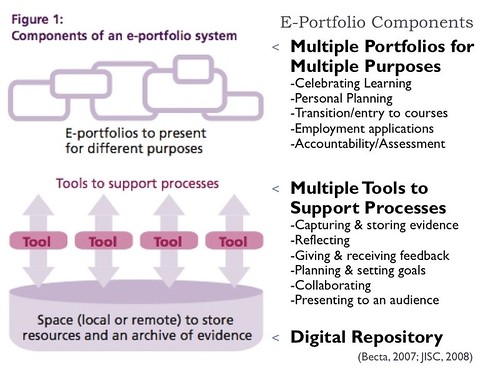
Electronic Portfolio Components

Above is a diagram of eportfolio components as described in BECTA and JISC reports, and you will see where there is a need to organize the Digital Repository: online space to store resources and an archive of evidence.  I have also defined the Two Faces of ePortfolios, which are the workspace (reflection + archive/collection) and showcase (presentation+feedback). Most of the commercial tools organize the showcase... no one independently organizes the workspace right now (except what I do on my own in my blog or in a spreadsheet/matrix). And it needs to be easy enough for a 3rd grader to use! Maybe I'm thinking about a version of the MyLifeBits research that Microsoft conducted around "life store" of data.

So, we'd love some input: what type of apps are needed to support ePortfolio development using mobile devices with access to the Internet?

Thursday, April 08, 2010

Writing this message at 30,000+ feet on my way to GSO via ORD while watching a podcast on my ipad. It was fun walking into the Seattle airport and logging into free wifi almost instantly. I also like the ability to prop up the ipad on my tray with the Apple case I bought. Now reading one of the books I downloaded, with letters at least one inch high. Maybe these middle-aged eyes won't be as tired when I land. I just wish it had a way to edit Word docs. I can send myself an email with text I am composing, but can't integrate it into a Word doc until I use my laptop. I have to remember that the ipad is not a laptop replacement. I would like it to be, but not yet.

Interesting article online about the rumored HP Slate running Windows 7 with 32 GB of storage for $550. If it runs GoogleDocs, it would be worth it, although a basic netbook costs $300. I'm sure this market will be interesting over the next year.

Sent from my iPhone

Sunday, April 04, 2010

Learning my new iPad

Yes, I waited in line yesterday to pick up the 16GB iPad I reserved. Daughter posted some Twitpix last night. Spent the afternoon exploring capabilities of my new iPad. I sent a long email and learned to type on the screen with my finger pads, trying to avoid my fingernails (not easy). I bought a Bluetooth keyboard, but am trying to get used to the keyboard.

I have been exploring the apps. I responded to a blog post using Safari, but couldn't scroll through the comment field beyond what I could see on the screen (no scroll bars or arrow keys on the keyboard). I created a blog post with the WordPress App (after figuring out how to publish) and am sending this entry to Blogger as an eMail. Tweetdeck works great. I am using the old Facebook app (not ready to pay for one). I am finding that the games I like on the iPhone are different on the iPad. Easier on the eyes, but harder on the arms (reaching with arms, not fingers). I am trying to limit the games, anyways.

So far, the major deficiency is Google Docs. I can read documents, but not edit them. In my long spreadsheets, I can't scroll to data that is off the screen (I can scroll and do minor editing on my iPhone). Haven't tried Google Sites yet. As a media consumption tool, it looks like a dream. But in education, that is not the model we want to perpetuate. Yes, I can see the potential for textbooks in this format, but I want to be able to use cloud computing tools for content development, not having to buy iWork for this iPad. I know this is just the first day, but if it is going to be more than a print/paper replacement, we need to be able to use online content development tools. Of course, I want to see how it can be used to develop and maintain e-portfolios! Since I will be attending the ADE Institute this summer, where we will focus on Mobile Technologies, I hope to explore these issues further.

Sent from my iPad

Monday, March 29, 2010

WORDLE on ePortfolios

Share photos on twitter with Twitpic From Twitter today: "RT @chamada RT @RobinThailand: The Tweeple have spoken! A WORDLE on ePortfolios created by Twitter submissions. Thanks all.  http://twitpic.com/1bv58m"

My first impression: Why is the word assessment larger than the word reflection?
Reblog this post [with Zemanta]

Sunday, March 28, 2010

WordPress and high school ePortfolios

D. S. Watts (teachwatts) has posted a series of blog entries this spring on using WordPress as a blog for her high school students. 

Sunday, March 14, 2010

TEDxASB Presentation

The video of my TEDxASB presentation has been posted to YouTube.

Electronic Portfolios have been with us for almost two decades, used primarily in education to store documents and reflect on learning, provide feedback for improvement, and showcase achievement for accountability or employment. Social networks have emerged over the last five years, used by individuals and groups to store documents and share experiences, showcase accomplishments, communicate and collaborate with friends and family, and, in some cases, facilitate employment searches. The boundaries between these two processes are gradually blurring. As we consider the potential of lifelong e-portfolios, will they resemble the structured accountability systems that are currently being implemented in many higher education institutions? Or are we beginning to see lifelong interactive portfolios emerging as mash-ups in the Web 2.0 cloud?

Thursday, March 11, 2010

Ning and ePortfolios

I'm visiting an intermediate school in Auckland, New Zealand, observing how they are implementing e-portfolios school-wide. They have chosen to use a variety of Web 2.0 tools, but the student portfolios are stored behind passwords in a local LMS, KnowledgeNET. Their storage in this system is limited, so they are using a variety of Web 2.0 tools to store their artifacts; they post their videos in YouTube (this is a school that doesn't block most websites) and Ning. While they can't link to work posted on a Ning page (requires an account to read the page), they can get an Embed code for a video posted on a Ning account, and can embed that video into their portfolios. The teacher sets up one account per class, and the students use that account to post their videos. Very creative!

UPDATE April 15, 2010: Ning just announced they are eliminating their free accounts. What other "free" websites will pull a Ning? How can educators predict and protect their networks and data?

Tuesday, March 09, 2010

National Educational Technology Plan

I found two references to electronic portfolios in the National Educational Technology Plan:
Technology also gives students opportunities for taking ownership of their learning. Student-managed electronic learning portfolios can be part of a persistent learning record and help students develop the self-awareness required to set their own learning goals, express their own views of their strengths, weaknesses, and achievements, and take responsibility for them. Educators can use them to gauge students’ development, and they also can be shared with peers, parents, and others who are part of students’ extended network. (p.12)
Later in the publication, the following statement appears:
Many schools are using electronic portfolios and other digital records of students’ work as a way to demonstrate what they have learned. Although students’ digital products are often impressive on their face, a portfolio of student work should be linked to an analytic framework if it is to serve assessment purposes. The portfolio reviewer needs to know what competencies the work is intended to demonstrate, what the standard or criteria for competence are in each area, and what aspects of the work provide evidence of meeting those criteria. Definitions of desired outcomes and criteria for levels of accomplishment can be expressed in the form of rubrics. (p.34)
Is there some dissonance between these two statements? How will the two approaches (a student-managed learning portfolio and an analytical framework...to serve assessment purposes) co-exist? Or will we need to use two different environments: One that is student-centered, that allows personalization and communication, and another that can be used to hyperlink into student portfolios to "harvest" assessment data, without interfering with the student-centered representation of learning? Please?

Saturday, February 27, 2010

Mumbai Musings

My meetings with teachers and my e-portfolio workshops are all over at the ASB Unplugged International One-to-One [laptop] Learning Conference in Mumbai, India. Heading for New York late tomorrow night... will be traveling for 26+ hours, from the time we leave our hotel at midnight until we get to Newark. It's been a wonderful nearly two weeks here in India. No health problems (other than my arthritic knee). Lots of new friends from all over the world. Hope to come back.

Wonderful work being done in this international school, and many others. They have a vision for integrating technology across the curriculum, for meaningful learning. I am even more convinced that this is the way to go to really change our educational system, especially after seeing a group of 3rd graders showing their Google Sites e-portfolios to a lot of adults in a presentation yesterday... with such poise and self-confidence. They and their talented teachers are leading the way developing e-portfolios in this school, and I've been privileged to work with them this school year... so inspiring to see my ideas in action modified with their practical strategies in the reality of their classrooms.

This school is going to be one of the case studies in the book I am writing. I was in the 3rd grade classrooms on Thursday, and had an opportunity to talk with students in one class, and observe the students showing their portfolios in all three classrooms. Then I attended the presentation of the threeteachers, with the assistance of about 20 of their students, who took their laptops (they each have their own) throughout the room, sharing their portfolios with a lot of strangers (most of them teachers or administrators from International Schools from Europe and Asia). It was inspiring!

Tuesday, February 23, 2010

ASB India

I am working on my TEDxIndia presentation on Thursday in Mumbai. I've been in India for a week, and it has been a spectacular trip, both visiting the American School of Bombay, and spending the weekend in Delhi and Agra (including a visit to the beautiful Taj Mahal!). It has been fascinating to see what can be done within a 1-to-1 laptop program, beginning in 3rd grade. I have been meeting with a variety of teachers for the last week, answering questions about ePortfolios, and trying to demystify the process. This is a PYP elementary school, and the students have been maintaining paper portfolios for quite a while, so adopting an electronic portfolio is natural transition in their 1-to-1 program.

I've been working with some of the teachers over the year, with short web/audio conferences on a monthly basis, and I am excited to see what the 3rd grade students have achieved using Google Sites. They have set up pages for each content  area using the Announcements page type, adding entries on a regular basis. One teacher says some of the students are making entries on their own, without prompting. The school videotaped those students talking about their portfolios. Many of their comments were priceless! I am hoping they will post the video online, so that I can link to it.

I am preparing for my TEDxIndia talk. The narrative is posted as a GoogleDocs document, and the slides are posted to SlideShare.
I would love some feedback on the ideas about how the boundaries are blurring between Social Networking and ePortfolio Development, and the need for more intrinsic motivation, based on Dan Pink's book, Drive.

Sunday, February 14, 2010

Exciting week in Brooklyn

I was in Brooklyn all week, conducting workshops for the New York City Schools, Office of Education Technology for South Brooklyn, Staten Island. I knew they were interested in electronic portfolios, because I had email communication since last spring. We held our first training this week, showing teachers how to create their own portfolios with Google Docs and Google Sites. The first two-day workshop was held Monday and Tuesday, and was overflowing (we moved to a larger room the second day). The second workshop was supposed to begin on Wednesday, but was postponed for a day because of the snowstorm that hit the New York area. I heard about 50 MPH winds hitting the Empire State Building, knocking out satellite dishes for cable TV, but it was just snow in Brooklyn. I had a day off, and postponed my flight to return later on Friday.

I am impressed with the interest in e-portfolios in this program. It is also refreshing to see the emphasis on teaching portfolios as well as student portfolios… that to really appreciate the process, teachers need to construct their own portfolios before trying to implement them with students. I am also impressed with their commitment to learning portfolios for students, not for accountability. I am interested in being able to demonstrate the value of formative, self-assessment portfolios before they might get co-opted for summative assessment.

I just found out that New York City Schools is adopting a combination of ePals (for student mail and collaboration) with GoogleApps (minus GMail) next year. That makes the training that I did this week very relevant for them. They are also looking for schools in other parts of the world to collaborate. As more educational institutions adopt Google Apps, they have a ready tool for building interactive portfolios.

I'll be back in March (on my way back from India), and will be working under a different grant, where I will focus on e-portfolios as professional development environments for teachers (online personal learning environments).

Tuesday, February 02, 2010

Blogger discontinuing FTP support

Today, Blogger announced that they will no longer support FTP publishing in Blogger after March 26, 2010. I have been publishing this blog to my own web server since May 2004, using FTP almost from the beginning because, at the time, I didn't want ads on my blog (no longer an issue). Now, I need to make a decision... do I host this blog as a blogspot.com address (not accessible on a lot of school networks), or do I host it on a custom domain (I have a couple of them that I am not using), or do I transfer the whole thing over to WordPress.com (not possible in the current FTP format)? So, I have a few weeks to make a decision... but I will be doing a lot of traveling between now and the end of March (New York, India, New Zealand, Sedona). I will post my decision soon, and will do the appropriate re-directing on my web server. Still, it is irritating, at a time when I am going to be very busy!

Thursday, January 28, 2010

Narrated Presentation

Balancing the Two Faces of E-Portfolios

I created a video tour of the new CIC website and added a narrated version of the presentation that was made at the Chief Academic Officers Conference of the Council of Independent Colleges, November 2009; audio recorded at Kapi'olani Community College, January 2010. I posted the presentation only in my blip.tv video collection. This one focuses on a higher education audience, and provides my most recent rationale for eportfolios as both workspace and showcase, addressing both paradigms of assessment: improvement or accountability.

Tuesday, January 26, 2010

Microsoft Resource on Digital Storytelling

When I was at the Hawaii International Conference on Education, I heard Bernard Robin present on Digital Storytelling, and he mentioned that Microsoft was releasing a Digital Storytelling resource guide for teachers, using the new Windows Lime MovieMaker (for Windows 7) and PhotoStory for Windows XP. Looks like some nice work and good resources.

Monday, January 25, 2010

AAC&U ePortfolio Symposium

It is a rare meeting where I will travel all the way across the country for a single day (and two nights) when I am not working or presenting, but the AAC&U meeting in Washington, D.C., was worth the miles traveled. I connected with friends and total strangers came up to me, acknowledging my work. The opening session was conducted by Bret Eynon and Elizabeth Clark from LaGuardia Community College, providing an overview of their program, a model for community colleges around the country. I then attended a breakout session conducted by Dr. Mentkowski from Alverno College, a pioneer in e-portfolios and "Learning that Lasts." I attended their Assessment Institute over six years ago, and their model of assessment-as-learning is the process underlying their use of portfolios and e-portfolios.

The lunch speech was given by Melissa Peet from the University of Michigan. She did an outstanding job with examples of a process of reflection that can transform students' perspectives on leadership and social change. I had an opportunity to have a very enjoyable dinner with her, along with Trent Batson and the two presenters from Laguardia Community College. I am anxious to read more about Melissa's work at UM.

After lunch, there were five mini-presentations, and then many more table groups where we could talk in-depth to one of the presenters. I sat at Gail Ring's table to learn more about the Clemson ePortfolio graduation requirement. They have students create their portfolios using Google Sites, and have provided a lot of support materials. They also created their own assessment management system to manage the collection of key assignments demonstrating required outcomes and scoring of the portfolios. There was also panel on assessment that included Trudy Banta (she told the story about the questions she asked at the IUPUI Assessment conference... described in my blog). Finally, Randy Bass gave the closing keynote, about ePortfolios in the "Post-Course" Era. It was a very thought-provoking presentation. I hope they will be posting podcasts of the major presentations.

Sunday, January 17, 2010

My Wish List for Audio in Google Docs

Now that we can Upload Anything into Google Docs, I have a wish list for more upgrades. I want to be able to embed and play audio files that I store in my Google Docs account, not just download them. As indicated in my last blog entry, I was able to embed an uploaded MP3 on a Google Sites page, but it wasn't easy. I'm looking for a gadget to embed stored audio as easily as embedding a YouTube video. I want Google Docs to generate an embed code, not just a link to download an MP3. Or give me a menu item in Google Sites.

I realize there is the potential for copyright abuse with MP3s, but I want to be able to create audio narrations to go along with the other artifacts in a portfolio. Students learning to speak another language need an easy way to capture spoken evidence of their learning. Of course, the user interface is also an issue, since it is usually young children who can talk about their learning before they can write about it... or collect reading samples, now sometimes done with iPods... so it needs to be easy enough for elementary teachers and students to use.

Even better, a built-in tool like Myna would be terrific, that would allow someone to record a narration that would get embedded on a page! The first e-portfolio tool that I ever used (the Grady Profile originally written in Hypercard) had the built-in ability to record audio (specifically reading samples). That was 1991! I don't know of any web-based e-portfolio tool with the ability to capture audio directly (rather than uploading a pre-recorded audio file). Right now, we often use Audacity for recording to our computers, exporting the audio clip to MP3, uploading/embedding the clip into whatever e-portfolio system we are using... a lot of steps. As we move to cloud computing, we need more simple cloud-based tools that don't rely on desktop applications.

Saturday, January 16, 2010

My Google Storage Activated

I woke up this morning to this message on my Google Docs page:

So, I found the three files that I have been using in my study of online storage systems, and uploaded them to my Google Docs account.  There were two PDF files (Google Docs has been able to store PDFs for the last year) and one 10MB MP3 file of my presentation at a conference. I proceeded to experiment based on instructions in a website that I recently found: How to Embed MP3 Audio Files In Web Pages With Google or Yahoo! Flash Player. I used the code for the Google Reader player, and I embedded it on a demo Google Site I was using for a class. It took a couple of tries, because I don't think Google is supporting the embedding of MP3 files, but I made it work by tweeking the download URL on the Google Docs download page for that document (removed the download suffix on the URL).

Euripides said... An update- I was told after uploading one of my podcasts that "sorry, we do not currently support MP3 files"
Obviously! The process I went through worked, but it was not for the faint of heart (or those who don't understand URL codes). I hope that there will be a gadget soon, that will make this process seamless, just like embedding YouTube videos. Using divshare.com to embed audio with a player is much easier!

Tuesday, January 12, 2010

Google Online Storage...Finally!

Today, the Official Google Docs Blog announced "the ability to upload, store and organize any type of file in Google Docs." Finally! (at least some time over the next couple of weeks)
...you can upload to Google Docs any file up to 250 MB. You'll have 1 GB of free storage for files you don't convert into one of the Google Docs formats (i.e. Google documents, spreadsheets, and presentations), and if you need more space, you can buy additional storage for $0.25 per GB per year...
According to the response to questions in the Comments in this blog entry, the additional storage is shared between Picasa Web Albums, Gmail and Google Docs. The cost is described on this page. Picasa (images) provides 1 GB free storage, GMail provides 7+ GB free, and now GoogleDocs provides 1 GB free. You can't share free storage between applications, but if you upgrade even the smallest amount (20 GB for $5 per year), you can use that extra storage in any of those tools.

The Google Enterprise Blog Entry indicates that this capability is available to GoogleApps users (also for GMail accounts). For now, the Documents List API will only be available to GoogleApps Premiere domains (what about Education Edition?).

Assuming this functionality is available to Education accounts, for ePortfolios, we finally have our digital archive that will hold any type of file. GoogleDocs Folders can also be shared. I can hardly wait to see how it works. Will the files have an Embed code? Are they individually linkable? I am specifically looking for the ability to embed audio files, much as we can do with YouTube videos. Will it be easy enough for a primary student to use??? Some of the comments in the blog are asking for a DropBox-type of interface (synchronize contents of folders). I agree!

UPDATE: In response to public requests, Google increased the maximum file size to 1 GB while also adding a Thumbnail view to your GoogleDocs Home page (Documents List).