Showing posts with label blogs. Show all posts

Tuesday, July 12, 2016

Blogging results from New Zealand schools

Interesting blog post from Dorothy Burt, Point England School, Auckland, New Zealand. My daughter Erin and I visited this school five years ago and I have been following their student blogging program as an example of online learning journals (working portfolio). Nice to see writing outcomes (not the first report of this type). As she says, "...a generation of young people have been through our schools knowing that sharing your learning publicly is an important part of the learning process."
http://manaiakalani.blogspot.com/2016/07/blogging-supports-writing-outcomes.html

Wednesday, January 28, 2015

Resurrecting this blog

For the last two-and-a-half years, I have been ignoring this blog. The reasons were both personal and professional. My elderly mother came to live with me in 2012, and my attention was diverted to more retirement activities; I bought a Kindle, then a Kindle Fire HD, activated my Audible account and have accumulated some wonderful ebooks and audio books! My professional travel has also been greatly reduced (I am no longer MVP on Alaska Airlines -- sniff!). But today is my birthday; I received many wishes on my Facebook page, and I received a very interesting email from a K-12 school district, which made me realize that there is still interest in my ePortfolio expertise.  So I decided to get caught up with posting past presentations and other communications that I thought worthy of sharing.

While I won't post as often as in the past, I think it is time to pay more attention to my blog. I expect to post more interesting weblinks that I have just been uploading to my delicious account. Next week I will leave for a week working with Waikato University in New Zealand. After the webinar that I participated in through the Center for Digital Storytelling, I became energized by using the WeVideo tool. So, I am preparing a proposal to work with a local school on digital storytelling with teachers and high school students using WeVideo, I hope! It is time to rewire rather than totally retire!

Monday, October 10, 2011

SPU bPortfolio process wins award

Sloan-C will formally recognize SPU's work as an effective practice award winner for 2011 at a featured session at the 17th Annual Sloan-C International Conference in Orlando on November 11, 2011. The award acknowledges SPU for advancing learning, access, scale and student and faculty satisfaction.
The project description that won one of four 2011 Sloan-C Effective Practice Awards: bPortfolios: Blogging for Reflective Practice - Seattle Pacific University    http://bit.ly/pamT5d
It is so great that these efforts have been recognized by such a prestigious organization. It is important to gain more recognition for the benefits and outcomes of supporting student reflection and ownership of documenting their own learning, whether in teacher education, or in K-12 classrooms. SPU's Teacher Education Program should be proud of creating an environment that balances learner-centered reflection with institutional assessment. Students are also experiencing a model of electronic portfolio development that can be adapted to K-12 students using widely-available and free online tools.

I appreciate the opportunity to add my very small contribution (and my name) to the application. Since my ideas were credited as part of their initial decision to adopt a blogging platform and move from their previous commercial system, I am very proud that these efforts have been recognized.

UPDATE: Blog responses to this award:
‘ePortfolios’ are out, ‘bPortfolios’ are in (apparently) 
At Last – Recognition for Blog-based Portfolios

Friday, June 17, 2011

Links to recent E-Portfolio articles and blog posts

I've come across some recent articles and blog posts that provide interesting reading about e-portfolios.
  • E-Portfolios Evolve Thanks to Web 2.0 Tools in EdWeek, June 15, 2011.  I am quoted in the article and I previously blogged about my visit to Rob Van Nood's classroom, the first example (I made the connection between him and the author). Here is my comment on the EdWeek article:
    Thanks for the examples, including Rob's classroom, which was a fun place to visit. The need for teacher professional development is important to meet the potential of e-portfolios to engage students in managing their own learning. That is why next week at the ISTE Conference, I am launching the REAL* ePortfolio Academy for K-12 Teachers (*REAL = Reflection, Engagement, Assessment for Learning).  Primarily through online courses which establish grade-alike Communities of Practice, K-12 teachers from across the world will learn portfolio development principles, share strategies, and support each other in implementing e-portfolios using free Web 2.0 tools.
    Dr. Helen Barrett http://electronicportfolios.org/academy/
  • Nick Rate's recent blog post, ePortfolios in the News,  has links to some new websites. Two I particularly like:
    Eportfolios - J'accuse where the author discusses the benefits of using a blog as an e-portfolio over specialized e-portfolio systems: Over-complication; Institutional, not user focus; Focus on the tool, not the skills; Lack of social element; Educational arrogance.

    E-portfolios – 7 reasons why I don’t want my life in a shoebox:  Uninteroperable; Institutionalised; Human nature; People are not learners [I disagree!]; Boundary problems; Plus ca change [the only constant is change]; Recruitment myth. I agree with some of his comments, but I think he misses the potential in others. The author, Donald Clark will be a presenter at the EIFEL Conference in July in London. I think I will be leading the panel.

    The comments on both of these blogs are great reading!
  • Blogs as Showcase Portfolio by Kim Cofino, June 12, 2011. This is a GREAT resource (she uses WordPressMU with her 6th grade students... see examples). I love Clint Hamada's comment on this post, partially copied here:
    Kim, thanks for highlighting the ease of using blogs as a portfolio tool. The key, I believe, is to create a culture of blogging (and sharing and reflecting) as part of the day-to-day workings of the school. Then the showcase is truly that: a showcase of things students have already done that do not require any huge amounts of work to prepare!
    My response: I love this post and Clint's follow-up comment. The first level of building an electronic portfolio is to capture and save work in digital form (integrate technology into the teaching/learning process); the second level is to set goals and reflect frequently (a blog is the perfect environment for connecting artifacts and reflection); the third level is building a showcase portfolio at specific times during the school year (parent conferences? formal presentations of learning?). I discuss this process in more detail in my online article, Balancing the Two Faces of ePortfolios (2011, British Columbia Ministry of Education, Innovations in Education, 2nd Edition). I’ll be sharing your links! Thanks!
There is a theme in these blog posts, and in my recent research for my book: blogs are a great tool for developing e-portfolios, from Kindergarten through adulthood. People have been keeping written journals for centuries; blogs provide a similar space for reflection and deep learning, with a significant difference in storage and permanence. (I once blogged about the loss of physical memories through natural disasters, such as floods or fire: Digital Archive for Life, 2005) As long as Blogger keeps it stored digitally, it should last my lifetime and beyond (I've misplaced a lot of paper journals over the years). But every so often, I back it up... JUST IN CASE!

I've created many versions of my thematically-organized presentation portfolio, but I rarely visit or update these showcase portfolios (the only one I keep updated is my GoogleSites URL-branded version, first developed in 2008). My reflections are posted in this blog, which I consider my learning portfolio... and the easiest and most natural to maintain as a learning journal. The structure of a blog also lends itself well to comments and conversation.

Friday, June 03, 2011

Using ePortfolios as a reflective teaching tool - Case study


This video, "starring" Julie Hughes and two of her graduate students from the University of Wolverhampton in the U.K., was published by COFAonline at the University of South Wales in Australia. I love Julie's quote about blogging as: "thinking through your fingers."

Wednesday, March 30, 2011

The "Hook" at Pt. England School

I'm in New Zealand visiting Pt. England School in Auckland, where they are implementing Google Apps and Blogger and where they worked with hapara.com to develop a brand new Google add-on called Teacher Dashboard, a tool that provides a lot of support for a teacher managing a classroom full of student GoogleDocs accounts (and soon Google Sites and Blogger). On Tuesday night after school, I participated in a meeting of the school's "hackers": a group from the larger Auckland community who have gathered together (over food and beer) almost weekly over the last 18 months to support a systemic approach to implementing technology in the school cluster: http://www.manaiakalani.org/

This group began when the principal, Russell Burt, sent out an email: "Hackers wanted!" They have been working through all of the issues of implementation. On Tuesday night, they reworked their Design Principles: http://www.manaiakalani.org/home/design-guidelines. I was impressed with their vision for the project, and the "open source" nature of their development. This group of creative people came together to solve a problem...to take on a challenge, and the results are stunning!

There are plans to share the school's wifi throughout the entire school community, mostly on light poles (keep in mind, this is one of the poorest neighborhoods in Auckland, where there are few computers and little or no Internet access in homes). Observing the systemic approach as well as the implementation of netbooks for students beginning in Year 5 (9-10 year-olds) is also impressive; their parents will be paying NZ$15 a month for these netbooks which eventually will be going home with the students. The program plans to support these netbooks for only three years... they realize that the technology will be changing a lot, and the devices will need to be replaced!

I am observing classrooms where students are blogging using Blogger on a regular basis (http://www.ptengland.school.nz/index.php?family=1,451), even the Year 1 students (5 years old) have blog entries dictated to teachers in a class blog: http://pesyear1.blogspot.com/ (the students were so pleased when we commented on their posts).

If there is one thing I have learned in this school is that if you want the impressive gains that they have made in the poorest schools in Auckland (see their research report linked below), you need visionary leadership, a group of teachers that is willing to take on the challenges, but who are also well-supported with PD and equipment, and a "can-do" attitude. Every teacher has a Macbook and a netbook; in addition to the student netbooks, every classroom has at least five iMacs (of various vintages...I even saw some 10-year-old "jelly bean" iMacs in Year 1 classrooms). As you can see, this school cluster is a great example of what can be done with imagination, some extra funding, and leadership (can't emphasize it enough)! Thanks to fellow ADE Dorothy Burt and everyone at Pt. England School for making us feel so welcome!

Here is a link to their research reports: http://www.manaiakalani.org/research-1/2008---2010-report
Summary: The Project definitely provided a motivation for writing, an improvement in audience awareness and purpose and in presentation skills. Other school interventions also had an impact on literacy achievement; however the Project has provided a purpose and enthusiasm for literacy.
The students of Manaiakalani were provided with a “hook” (e-learning outcomes published in on-line spaces) which gave these decile 1 students a voice to be heard globally. Subsequently, participating in the Manaiakalani Project enhanced their literacy, engagement, oral language and presentation.
With the advent of netbooks in 2011, schools are starting on a new and innovative initiative that, with careful planning and implementation and adequate support and funding, could be the key to 21st century education in New Zealand.

Wednesday, September 22, 2010

Blogging on Paper

I found the following blog entry:
Learning to Blog Using Paper - a 7th Grade Teacher's clever introduction to blogging (starting with a paper exercise) and using "sticky notes" as comments. Here are the instructions for students (provided in Scribd):
- Seventh Grade Blogging Rules
- The Art and Aspirations of a Commenter

These are great guidelines for reflection and feedback by adolescents. It also looks like a great PD activity for teachers who are not familiar with blogging. 

Thursday, September 16, 2010

GoogleApps Education and Blogger

The message was posted to the Google for Educators Discussion Group:
Blogger has been added to the Educational Edition but the transition won't occur enmass until later this fall. Your GoogleDomain administrator can transition people to the new apps by going in the admin dashboard and "transitioning" users. I love it, I can now embed my Picasa3 slideshows and create an iGoogle page with RSS feeds, this will make school portfolios so much richer. 
I totally agree! When will Blogger be universally available in Google Apps Education Edition?

Wednesday, September 08, 2010

Kindergarten Portfolios with Blogger

I'm doing online research for my book, and found some great examples of using Blogger to create ePortfolios in Kindergartens. Here are some links:
http://kdgroom102.blogspot.com/ (Carol Stream, IL) - written up in a local newspaper
http://hunterparkkindergarten.blogspot.com/ (NZ - with links to 2 public blogs) It is obvious that the students are not posting to these blogs, and most of them are private, requiring an invitation to view. The two public blogs:
- http://hpkgtn09abigail.blogspot.com/  (NZ = public student example in Blogger - lots of embedded images+video) - The teacher added Labels (Tags) that can be selected under Quick find
- http://bennybee.blogspot.com/  Quote from profile:
This is my E-profile all about me!
Mum and Dad have decided to leave it an open blog as an exemplar of how e-profiles can be used to document and assess my learning and life as a partnership between my extended family, my teachers at kindergarten, my dance teachers, and when I get there my school teachers too.
Please enjoy and respect my E profile.
I have emailed the school to communicate with the teacher who put together these portfolios. I would love to have a conversation with more Kindergarten teachers who are implementing this process with their students.

Saturday, June 26, 2010

EduBloggerCon at ISTE10

I made it back to another EduBloggerCon prior to ISTE 2010 in Denver. It is very important for me to listen to teachers who are working with K-12 students and implementing Web 2.0 tools, although these were very advanced users! Lots of discussion of the iPad, and quite a few of them in the room. I took both my iPad and my laptop to the workshop, because I wasn't sure which one I would want to use. During the Smackdown (showcase of new Web 2.0 tools), I ended up using my laptop. Also, editing my Google Site... not possible with the iPad.

There were several sessions on the iPad: one led by a teacher who was really pro-iPad, another led by Scott McLeod, who brought up some serious questions about the trade-offs between consumption of data vs. production capabilities of the iPad. Lots of great discussion, documented in tweets using #ebc10ipad tag. No conclusions, because it is too soon, but some schools may be ready to replace laptops/netbooks with iPads, perhaps a premature decision. I said to wait until the Android tablets come out, and then compare the capabilities. I can still do more production on a laptop/netbook than my iPad. But there are advantages with battery life and instant on. Some educators are also impressed with the engagement of young students with reading on the iPad.

There were also good discussions on blogging with students, including Blogs as Web-Based Portfolios (PDF) from Jeff Utecht, International School of Bangkok. I also figured out how to organize my apps on my iPhone with iOS4, and touched an iPhone4. I'm trying to figure out when I will be home long enough this summer to buy mine. I want multitasking and iMovie for iPhone! (After updating my iPhone 3G to iOS4, it seems to run slower.) Dinner out with some teachers and more great discussion! Great Day!

Monday, April 26, 2010

Pages in Blogger

Where have I been? In February, Google added Pages to the tools available in Blogger. I realize that I was traveling non-stop in February and March, but I should have noticed the ability to Edit Pages in the Blogger Dashboard! It was when I finally moved this blog from my own FTP server back to Google that I paid attention to this new feature. The addition of (a maximum of 10) pages to a Blogger blog changes my opinion of using this tool for an ePortfolio. Although limiting a portfolio to 10 pages might be limiting for some people with a lot of categories or content, but for many people, this might be a good option for beginners. Just as I recommend using Blogger as a good starter blog, perhaps it will be a good tool for novice portfolio developers.

I have created a few pages so far (Resources on ePortfolio Development, and Versions of my Presentation Portfolio). Now I can develop a new presentation portfolio using Blogger (My Life Portfolio) and a set of instructions on how to develop ePortfolios using this tool (Using Blogger Pages to Maintain an ePortfolio).

My next request of Google: PLEASE include Blogger inside GoogleApps Education Edition. Most K-12 education networks tend to block blogspot.com addresses, and educators need a safe blog that can be created inside their GoogleApps "walled garden" that is protected and legal for students under the age of 13. Many educators use EduBlogs (a version of WordPressMU) but the Campus version for classes of students requires a fee, and the user interface is not as friendly as Blogger. The combination of GoogleDocs, Google Sites and Blogger would be a terrific environment to document learning for all ages!

Saturday, April 24, 2010

Moving my blog

I needed to move my blog to a new address, because Blogger will no longer support FTP as of May 1, 2010. Making the transition was easier in April than it was when I first looked at it in February. At first, I changed it to a eportfoliosblog.blogspot.com address... then I set up a new domain (at $10/year) and to my pleasant surprise, Google also set up a GoogleApps account. So my blog is now blog.helenbarrett.org and I can work with Docs and Sites once the domain is fully set up. So, there are benefits to migration that I didn't know about in February. Nice touch!

Sunday, March 28, 2010

WordPress and high school ePortfolios

D. S. Watts (teachwatts) has posted a series of blog entries this spring on using WordPress as a blog for her high school students. 

Tuesday, February 02, 2010

Blogger discontinuing FTP support

Today, Blogger announced that they will no longer support FTP publishing in Blogger after March 26, 2010. I have been publishing this blog to my own web server since May 2004, using FTP almost from the beginning because, at the time, I didn't want ads on my blog (no longer an issue). Now, I need to make a decision... do I host this blog as a blogspot.com address (not accessible on a lot of school networks), or do I host it on a custom domain (I have a couple of them that I am not using), or do I transfer the whole thing over to WordPress.com (not possible in the current FTP format)? So, I have a few weeks to make a decision... but I will be doing a lot of traveling between now and the end of March (New York, India, New Zealand, Sedona). I will post my decision soon, and will do the appropriate re-directing on my web server. Still, it is irritating, at a time when I am going to be very busy!

Thursday, December 17, 2009

Digital Narratives in Online Class

I just spent the afternoon reviewing and grading the final projects in the online class that I have been teaching this fall. One of the assignments was a narrated digital narrative, with the following instructions:
You will create a multimedia digital narrative (digital story with voice narration), that outlines your Technology Philosophy/Creed. This project will be submitted as a URL and embedded into your blog, and the script for your narration should include the references you used to support your statement. This digital narrative will be 4-to-5 minutes (400-500 words), recorded and illustrated with digital images, and posted online, either in YouTube/TeacherTube/SchoolTube (upload a digital video created with iMovie, MovieMaker or PhotoStory), or developed in VoiceThread.com, or developed as Powerpoint adding narration using Screenr.com. Digital images should be either Creative Commons (from Flickr search) or digital photos that you have taken or Powerpoint slides you have exported to JPEG or screenshots of educational websites. No student faces should be identifiable (see Privacy statement). 
I provided step-by-step instructions for using one of the free video editors (iMovie, MovieMaker2 or PhotoStory), and two Web 2.0 authoring tools (VoiceThread or Screenr). Given those choices, the final projects were developed using a variety of tools:
  • Screenr (7) -- many created in Powerpoint and recorded directly to Screenr website
  • VoiceThread (2)
  • a video editor (8) -- iMovie (3) and MovieMaker2 (5)
All of the students maintained a bPortfolio (blog-portfolio maintained in WordPress.com) and most of them embedded their videos using the following tools:
  • Youtube (8)
  • Screenr (5) (2 exported to YouTube)
  • motionbox (1)
  • voicethread (1) (one exported to YouTube)
  • vodpod (3) (to embed video in WordPress.com blog)
For many of these students, it was the first time they had created any type of digital video, or posted a video online. For an online class, there was no face-to-face assistance for the assignment, even though I offered to come on campus to provide a hands-on workshop (no one asked me). Some said that the hardest part of the project was embedding the video into their WordPress blogs (thus the use of vodpod.com). There was some push back when the assignment was first discussed on our last Adobe Connect Conference, but I provided both a practical and theoretical rationale. I am so pleased with the resulting assignments. I am going to ask for permission to post a few of them on the class website.

Wednesday, December 16, 2009

Portfolio Visualization

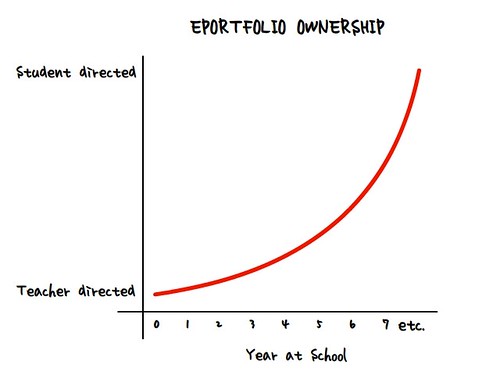
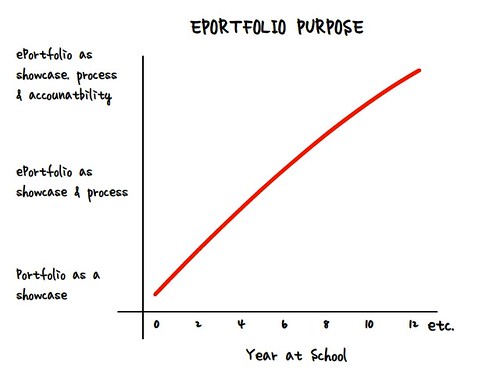
Nick Rate, educator and portfolio deep thinker from New Zealand, posted some simple, elegant diagrams on his blog: http://nickrate.com/2009/12/02/portfolio-visualisation/ These simple graphics help explain the progress of portfolio ownership and purpose over the school years.

There is something about these simple diagrams that help to explain a complex process. He also published a more recent blog entry that helps explain the inquiry process: http://nickrate.com/2009/12/06/inquiry-visualisation/

Monday, December 14, 2009

10 Reasons to use a Blog for your ePortfolio

Here is another blog entry from a faculty member at Boise State University, where I visited last week. It is refreshing to see faculty members model the use of blogs as a reflection space. Both Barbara and Lisa's blogs are developed in WordPress.com, taking advantage of the pages in addition to the blog entries. As they implement a reflective journal (aka, learning log) with their graduate students in the Educational Technology Program at Boise State, they will be providing a model of reflection that their students can emulate in their K-12 classrooms. Bravo!

Of course, all blogging tools are not created equal. I am creating this blog in Blogger, because that is the tool I started using in May 2004. Blogger allows Labels (key word tags) but not the categories available in WordPress. Blogger doesn't allow additional pages, like in WordPress. When I first started blogging, I posted duplicate entries to both a WordPress blog on my own server space (but gave it up after a few months as duplicative), and developed a portfolio using the pages and sub-pages available in WordPress.com (version 2.0+).  I keep a private personal blog in WordPress because I require a password to access the blog (or any individual entry in a public WordPress blog can require a password). So if WordPress has so many more features, why am I still writing this blog in Blogger? I think it is the user interface: Blogger is clean, simple, easy to use; I find the WordPress interface to be more cluttered, complex, but I can see its advantage for institutions that want to host the system on their own servers. For me, the major difference is that I can embed audio, video and slideshare files into my Blogger blog, but WordPress.com would require me to upgrade my account with VideoPress for an annual $60 fee (not applicable for sites hosting WordPress on their own server).

I just finished reading a dissertation written by an elementary teacher who implemented an electronic portfolio to support process writing with her fourth grade students using WordPress on a server in her school... in Greek! In the school where I worked in Turkey last month, that school is implementing e-portfolios with fourth and fifth grade students, making a transition from PowerPoint to WordPress on their own server... in Turkish! It helps to have a technology support staff! The value of this open source tool that can be installed on an institution's server, and modified to be implemented in the native language of the school, provides an easily modifiable environment to facilitate the reflection that is "the heart and soul" of a portfolio. My next project will be to test out the blogging capabilities built into the Mahara open source e-portfolio tool.

Thursday, December 10, 2009

Fun day at Boise State

I just spent a fun day at Boise State University, working primarily with faculty members in the Educational Technology program, to help them streamline their graduate student summative ePortfolio process. We used my "Balancing the Two Faces of ePortfolios" presentation and diagram as the framework for our discussions. It was really fun to talk with faculty members who knew the technology, and we were able to brainstorm strategies for building a reflective learning journal over time, to help students capture their learning (probably in a blog) throughout the program. Then, they would be more prepared to develop a final assessment portfolio at the end of the program, tied to the program standards. Overall, I was pleased with the discussion and I enjoyed seeing how a group of faculty worked together to improve their program.

At the beginning of the day, I asked how many of them had their own e-portfolios. There was a few tentative hands that went up... but at the end of my presentation, many of them who kept a blog (most using WordPress.com) were able to say that their blogs and the associated pages really represented who they were professionally. Lisa Dawley, the program chair, raised an interesting idea: to incorporate students' blog-folios into the LinkedIn professional network site, to begin building their professional network before they graduated... an interesting approach, especially as a showcase portfolio for employment and self-marketing. The LinkedIn site appears to work well with a WordPress.com blog. I am talking with schools that are using the Ning social networking site for similar purposes, all part of embedding academic work into a larger context. More to explore!

Monday, August 17, 2009

Blog Portfolio Model


I am in Texas, working with a school district, where they are implementing ePortfolios using EduBlogs (WordPress). Here is a new model that I created to help explain the process. I was reading David Warlick's Classroom Blogging book on the plane ride from Seattle to Dallas, and the concept of blogging as a conversation really resonated with me, as the left side of this diagram reflects. This model works with any blogging tool that also allows pages, such as Movable Type. I added a full size version of the graphic on one of my web pages.