On the last day of the ePortfolios in Ireland conference, I provided my favorite workshop on digital storytelling.
Showing posts with label storytelling. Show all posts
Showing posts with label storytelling. Show all posts
Thursday, March 24, 2016


Sunday, August 23, 2015
Fresno State University Keynote & Session
I had the privilege to provide the keynote address at a faculty development workshop at Fresno State University on August 20:
My colleague and fellow ADE Otto Benavides, took this photo where I am showing the Google Site that I set up for the workshop:
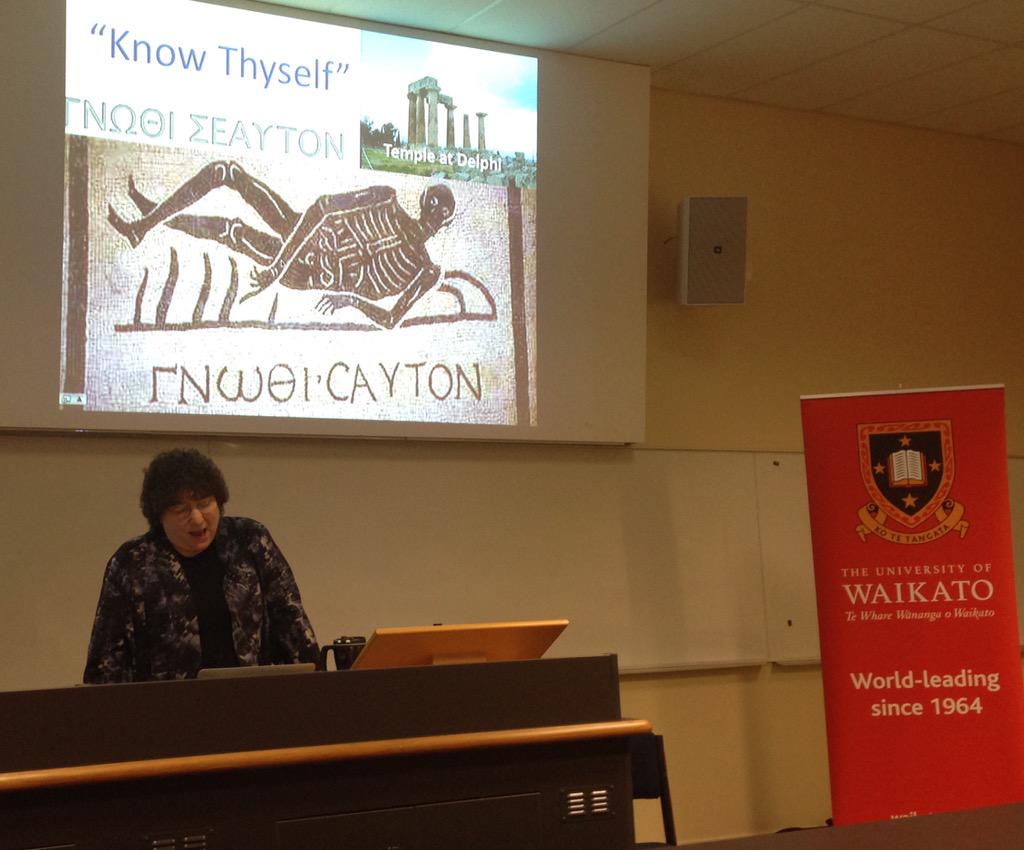
 After the keynote address, I provided one of my favorite presentations on digital storytelling and reflection (Know Thyself):
I really enjoyed the opportunity to meet new and old friends, and to continue to share my knowledge and passions for ePortfolios, reflection, and digital storytelling.
Wednesday, February 11, 2015
Hamilton, NZ Keynote
I am in Hamilton, New Zealand, presenting the keynote address at WCELfest2015. These are a great group of educators and it has been fun to share my ideas and see what they are doing with both ePortfolios and digital storytelling. Here are my slides:
 It is fun to follow my Twitter feed of comments. Here is a sample and a few images:
- tracey morgan @traceymorgan
encouraging students to be creative taking on a persona and telling stories #wcelfest - Nigel Robertson @easegill 36m36 minutes ago
Helen Barrett @eportfolios reflecting on the road taken. Her journey of choices in a digital story #WCELfest - Ursula @UrsulaEdg 38m38 minutes ago
@eportfolios great keynote #wcelfest thank you! #storytelling #elearning - Anne Robertson @robeanne 40m40 minutes ago Hamilton City, New Zealand
https://aboxofthistles.wordpress.com/2015/02/11/28daysofwriting-day-10-digital-story-telling/ … my first attempt at a digital story #wcelfest #eportfolios @eportfolios thank you - tracey morgan @traceymorgan 45m45 minutes ago
The challenge what story will we tell #wcelfest - Kristina DC Hoeppner @anitsirk 45m45 minutes ago
#wcelfest helen barrett: reflections & relationships are the heart & soul of an ePortfolio and not the technology. - Teresa Gibbison @gibbisons 46m46 minutes ago
@eportfolios with an important reminder #wcelfest - Nigel Robertson @easegill 46m46 minutes ago
The heart and soul of a portfolio is the relationships, the conversations, the interactions #WCELfest @eportfolios - Dianne Forbes @difo38 48m48 minutes ago
Range of tools for capturing, reflecting, sharing, learning. We are spoiled for choice #WCELfest - Noeline Wright @enrite 49m49 minutes ago
@easegill @difo38 #wcelfest yes- article still being cited 4 yrs later. Must have been one of first in education - Anne Robertson @robeanne 50m50 minutes ago Hamilton City, New Zealand
Eportfolios or Mportfolios - capturing the learning moment using mobile devices. So powerful #eportfolios #wcelfest - Teresa Gibbison @gibbisons 50m50 minutes ago
@eportfolios mPortfolios site https://sites.google.com/site/mportfolios/ … #wcelfest - Dianne Forbes @difo38 50m50 minutes ago
The essence of reflection: here's what, so what, now what? #WCELfest - Stephen Harlow @stephenharlow 51m51 minutes ago
.@eportfolios remembering meeting @arrowbound & Janice McDrury, authors of Learning through #Storytelling: http://waikato.lconz.ac.nz/vwebv/holdingsInfo?bibId=393722 … #wcelfest - Dianne Forbes @difo38 52m52 minutes ago
mPortfolios - reflecting in the moment #WCELfest - tracey morgan @traceymorgan 52m52 minutes ago
Mobile the future of eportfolio capturing the moment of learning #wcelfest - K Gilliver-Brown @kgilliver_brown 53m53 minutes ago
#wcelfest Dr. Helen Barrett: Coming to the realisation that the journey is as important as the destination. - Nigel Robertson @easegill 53m53 minutes ago
“@robeanne Process is more important than the output, that is where the learning is #wcelfest” #waitalk - Nigel Robertson @easegill 54m54 minutes ago
The process is much more important than the product. #learning #WCELfest - Dianne Forbes @difo38 54m54 minutes ago
#WCELfest portfolios & stories help us to recognise impt themes & patterns, informing decisions - Anne Robertson @robeanne 54m54 minutes ago Hamilton City, New Zealand
Who learns more in the classroom? The teacher or the students? #wcelfest #eportfolios - Anne Robertson @robeanne 55m55 minutes ago Hamilton City, New Zealand
Process is more important than the output, that is where the learning is #wcelfest - Nigel Robertson @easegill 56m56 minutes ago
'Making the focus of my portfolio the reality of my existence' Finding purpose in life #WCELfest - Anne Robertson @robeanne 56m56 minutes ago Hamilton City, New Zealand
#wcelfest our students need to know why and how they are learning and where they are going. #eportfolios - Nigel Robertson @easegill 58m58 minutes ago
Stories, ours and others, shape our memories #digitalstorytelling #WCELfest - Anne Robertson @robeanne 58m58 minutes ago Hamilton City, New Zealand
Whole idea of learning through story telling is very powerful and exciting #digitalstorytelling #eportfolios #wcelfest - tracey morgan @traceymorgan 59m59 minutes ago
Reflection how we learn, hold on to our stories, giving us our sense of self #wcelfest - Dianne Forbes @difo38 59m59 minutes ago
#wcelfest Telling stories is a way to deeper learning - Nigel Robertson @easegill 1h1 hour ago
Portfolios should be persuasive #ePortfolios #WCELfest - Anne Robertson @robeanne 1h1 hour ago Hamilton City, New Zealand
Experiential learning and portfolios. Learning from reflecting on experiences #eportfolios #wcelfest - Teresa Gibbison @gibbisons 1h1 hour ago
“@traceymorgan: @gibbisons capturing the moments #wcelfest ” love this pic! - Teresa Gibbison @gibbisons 1h1 hour ago
@eportfolios Reflection4Learning Google Site https://sites.google.com/site/reflection4learning/Home … #wcelfest - tracey morgan @traceymorgan 1h1 hour ago
@gibbisons capturing the moments #wcelfest - Nigel Robertson @easegill 1h1 hour ago
Getting a shout out at #WCELfest is @cogdog and his elephant thanks to @eportfolios - Anne Robertson @robeanne 1h1 hour ago Hamilton City, New Zealand
Digital stories to promote memory recall for Alzheimer sufferers #wcelfest #eportfolios - Nigel Robertson @easegill 1h1 hour ago
Eportfolios as part of your digital identity. What do you find when you Google yourself? #WCELfest - Dianne Forbes @difo38 1h1 hour ago
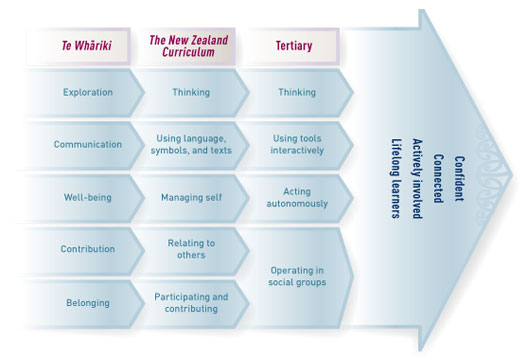
wcelfest what starts as well-being evolves into managing self and then to acting autonomously http://nzcurriculum.tki.org.nz/var/tki-nzc/storage/images/media/images/kl-images/key-competencies-cross-sector-alignment/3717-1-eng-NZ/key-competencies-Cross-sector-alignment.jpg … - Anne Robertson @robeanne 1h1 hour ago Hamilton City, New Zealand
Portfolios have to be formative not summative or it won't be student ownership or investment #wcelfest - Anne Robertson @robeanne 1h1 hour ago Hamilton City, New Zealand
Fascinating cultural study of parents who upload pictures of children on social media #eportfolios #lifelonglearning #wcelfest - tracey morgan @traceymorgan 1h1 hour ago
Scrapbooks of life experience activities of eportfolio #wcelfest - Teresa Gibbison @gibbisons 1h1 hour ago
@eportfolios URL #jisc Effective Practice with ePortfolios http://www.jisc.ac.uk/news/e-portfolios-tools-for-21st-century-learning-09-sep-2008 … #wcelfest - Nigel Robertson @easegill 1h1 hour ago
Students need continuous personal development and we must encourage and enable that. Universities are learning institutions #WCELfest - Anne Robertson @robeanne 1h1 hour ago Hamilton City, New Zealand
Eportfolios not just a storage space. A place for learners to find their voice #eportfolios #wcelfest - tracey morgan @traceymorgan 1h1 hour ago
Dialogue at the centre conversation of eportfolio #wcelfest - Anne Robertson @robeanne 1h1 hour ago Hamilton City, New Zealand
Eportfolios are laboratories where learners construct meaning #wcelfest - Dianne Forbes @difo38 1h1 hour ago
#wcelfest [people] who manage themselves are enterprising, resourceful, reliable, and resilient ... NZC 2007 http://nzcurriculum.tki.org.nz/The-New-Zealand-Curriculum/Key-competencies#M … - Nigel Robertson @easegill 1h1 hour ago
“@difo38 And of course self management is a key competency in the nz curriculum #wcelfest” And should be a graduate attribute #waitalk - tracey morgan @traceymorgan 1h1 hour ago
Students constructing meaning #wcelfest - Anne Robertson @robeanne 1h1 hour ago Hamilton City, New Zealand
Questions for forming personal growth portfolio to help recognise learningfrom Peter Drucker #eportfolio #wcelfest - Teresa Gibbison @gibbisons 1h1 hour ago
@eportfolios 'Know Thyself" #wcelfest - tracey morgan @traceymorgan 1h1 hour ago
Know thyself, life long learning, the magic of reflection via the portfolio #wcelfest - Anne Robertson @robeanne 1h1 hour ago Hamilton City, New Zealand
The starting point has to be the learner building self awareness and understanding #eportfolios #wcelfest - Dianne Forbes @difo38 1h1 hour ago
And of course self management is a key competency in the nz curriculum #wcelfest - Nigel Robertson @easegill 1h1 hour ago
Eportfolios are like the Blind Men and the Elephant. Stand back and understand the bigger picture of eportfolios #WCELfest - tracey morgan @traceymorgan 1h1 hour ago
Showcase, assestment, development, personal ownership #folio #wcelfest - Dianne Forbes @difo38 1h1 hour ago
Why? Depends on which part of the elephant we perceive #wcelfest Fundamentally about student choice & voice - Anne Robertson @robeanne 1h1 hour ago Hamilton City, New Zealand
Eportfolios for showcase, assessment and reflection. It is all that things #wcelfest just like the blind men and the elephant - Dianne Forbes @difo38 1h1 hour ago
Self, artifacts& reflection - digital storytelling and eportfolios with @eportfolios Helen Barrett #wcelfest - Nigel Robertson @easegill 1h1 hour ago
“@difo38 Making thinking visible, archive of evidence, multi-purpose, multi-tools #wcelfest” The multiple facets of eportfolios - Anne Robertson @robeanne 1h1 hour ago Hamilton City, New Zealand
Hear the learner's voice through digital stories in eportfolios #digitalstorytelling #eportfolios #wcelfest - Stephen Harlow @stephenharlow 1h1 hour ago
"#ePortfolios make thinking visible" @eportfolios @visiblelearning #wcelfest - tracey morgan @traceymorgan 1h1 hour ago
Hearing the learrners voice #wcelfest - Dianne Forbes @difo38 1h1 hour ago
Making thinking visible, archive of evidence, multi-purpose, multi-tools #wcelfest - Anne Robertson @robeanne 1h1 hour ago Hamilton City, New Zealand
Eportfolios and digital story telling go hand in hand. Possibilities for deep learning #eportfolios #wcelfest - Nigel Robertson @easegill 1h1 hour ago
Dr Helen Barrett delivering the #WCELfest keynote at Waikato University #WaiEvents - mel @melchivers 2h2 hours ago
Eportfolio as both a workspace and a showcase. #WCELfest - tracey morgan @traceymorgan 2h2 hours ago
Collecting of artifacts, leonardo, making Thinking visible #wcelfest - Anne Robertson @robeanne 2h2 hours ago Hamilton City, New Zealand
Portfolios make learning visible #wcelfest #eportfolios #davinci - Anne Robertson @robeanne 2h2 hours ago Hamilton City, New Zealand
A portfolio has a different meaning for every walk of life #wcelfest what does it mean to you? - Anne Robertson @robeanne 2h2 hours ago Hamilton City, New Zealand
Portfolios for lifelong learning for identity development #WCELFEST - Nigel Robertson @easegill 2h2 hours ago
Portfolios not just for students, teachers should use them too #WCELfest - Anne Robertson @robeanne 2h2 hours ago Hamilton City, New Zealand
Rewired rather than retired - love it! @eportfolios #wcelfest - Anne Robertson @robeanne 2h2 hours ago Hamilton City, New Zealand
Building stories for reflection through #eportfolios recognizing how much we have learned @eportfolios #wcelfest - tracey morgan @traceymorgan 2h2 hours ago
My hero helen barrett creates Google site #wcelfest - Stephen Harlow @stephenharlow 2h2 hours ago
.@eportfolios tuning up the #WCELfest audience @waikato with her keynote: Know Thyself: #ePortfolios & Reflective Stories of Deep Learning - tracey morgan @traceymorgan 2h2 hours ago
Dr Helen Barrett about to give us the lowdown on eportfolios & reflective stories #wcelfest

Tuesday, January 06, 2015
Digital Storytelling with WeVideo
I just finished a webinar series sponsored by the Center for Digital Storytelling on creating digital stories with WeVideo. I went through the process and learned to use the tool, and I am VERY IMPRESSED with this online video editing tool. It reminds me of the version of iMovie that I loved (and Apple ruined--iMovie6).
This website provides a concise description of creating a digital story with still images:
Create a photo story with WeVideo

Here are some tutorials on the WeVideo site:
Personal Narrative & Digital Storytelling with WeVideo [Part 1]
Personal Narrative & Digital Storytelling with WeVideo [Part 2]
Personal Narrative & Digital Storytelling with WeVideo [Part 3]
WeVideo Academy on YouTube (tutorial videos)
I created a very personal family story using WeVideo, so I will not post it here in my professional blog. However, I will work on another story that I will be able to post. I also hope to work with students and educators on creating digital stories for deep learning.
This website provides a concise description of creating a digital story with still images:
Create a photo story with WeVideo

Here are some tutorials on the WeVideo site:
Personal Narrative & Digital Storytelling with WeVideo [Part 1]
Personal Narrative & Digital Storytelling with WeVideo [Part 2]
Personal Narrative & Digital Storytelling with WeVideo [Part 3]
WeVideo Academy on YouTube (tutorial videos)
I created a very personal family story using WeVideo, so I will not post it here in my professional blog. However, I will work on another story that I will be able to post. I also hope to work with students and educators on creating digital stories for deep learning.
Sunday, August 07, 2011
ePortfolio Workshop in a Montessori School
I just led a workshop at the Montessori Hale O Keiki school in Kihei, Maui. My slides for this workshop are below. The website to support the workshop: https://sites.google.com/site/montessorihaleokeiki/
The school has a Schools of the Future foundation grant, and will be focusing on the integration of individual ePortfolios in grades 4-8, with class or group portfolios in the primary years. On the first day of the workshop, we started using the Edmodo social networking tool and then we focused on collaborative writing using GoogleDocs; on the second morning, we set up individual teacher Google Sites. The school has purchased iPads and iPod Touch devices to use in the classrooms, so we explored using the cameras and StoryRobe to create short digital stories, which these teachers embedded in their Google Sites. According to feedback (PDF) from one of the participants:
The school has a Schools of the Future foundation grant, and will be focusing on the integration of individual ePortfolios in grades 4-8, with class or group portfolios in the primary years. On the first day of the workshop, we started using the Edmodo social networking tool and then we focused on collaborative writing using GoogleDocs; on the second morning, we set up individual teacher Google Sites. The school has purchased iPads and iPod Touch devices to use in the classrooms, so we explored using the cameras and StoryRobe to create short digital stories, which these teachers embedded in their Google Sites. According to feedback (PDF) from one of the participants:
I especially liked the “MyStory” activity with StoryRobe. What a simple tool, but so much fun! As I was walking around the Montessori Hale O Keiki campus snapping my shots, I thought that this activity could really lend itself well to students who struggle with language... I thought of the saying, “A picture is worth a thousand words”, and it is so true. What a fun way to share a little something about “who I am” with the world. I think that activities like this one can really help a struggling student with self-esteem and pride in their school work.The participants left the workshop with a brief plan to implement this ePortfolio/storytelling process with their students. I am very interested to follow their progress. This is the first time that I have worked with a Montessori school, but I was told that my presentation very much matched their philosophy of learner-centered education.
Wednesday, February 23, 2011
ITSC Conference Reflections
I spent three days in Portland at the ITSC 2011 Conference. They built an app, which linked to a mobile-friendly website. I don't normally go to a conference where I am not presenting, but I was fascinated by the program. I enjoyed the following sessions/workshops:
- Canby SDs iPod touch & iPad 1:1 Classroom Implementations - I plan to visit this district, where every 3rd grader in the district gets an iPod Touch. They have shown some dramatic increases in literacy and math scores of students in classrooms using these tools. Notable links: Main wiki on iPod use, Using iTunes as a Digital Portfolio. I was especially impressed with the story Joe Morelock told about how students post goals for the week with Corkulous - a cork board app ($4.99). A student creates a collection of cork boards, building small portfolio on device. Students set weekly goals in one color, show accomplishments in another color.
- Rethink, Relearn: What it means to think, learn and design curriculum with Dr. Roger Schank. I attended this conference because he was one of the keynote speakers and I have his book, Tell me a Story. I enjoyed the opportunity to work with Jackie Gerstein and another educator from Oregon, where we explored a lot of ideas around how students can find their purpose and passions. We entitled our GoogleDoc, "Everyone has a story" and we compiled a lot of resources on daily reflection, goal setting and how do we help students find their “spark?” A spark is something that gives your life meaning and purpose. It's an interest, a passion, or a gift. What do you bring to the world that is good, beautiful, and useful? It was a very exciting morning.
- This looks interesting with Alec Couros and Dean Shareski - Lots of new apps and websites: Tagxedo.com, Instapaper, safeshare.tv, fur.ly, ujam.com, pen.io, min.us/
- Beyond Search with Lucy Gray - Learned lots of new ways to search Google. I especially liked www.sweetsearch.com which is powered by Yolink. Google Search Lessons, Lucy's slides in Slideshare
- Mobile Learning in Your School with Ira David Socol (he helped his son create todaysmeet.com)- This was a good opportunity to learn from other educators about why and how to use mobile phones in education: let students choose their own device (SODs -- Student-Owned Devices). Start with calendar, use mobile organization of the day. I learned how to email reminders from Google Calendar. Other links we explored: polleverywhere.com, www.mobilestudy.org. We explored Dragon & Vlingo (voice to text) which doesn't work well with children's voices. He talked about MITS Freedom Stick (4 GB flash-based Freedom Drive-- some use MP3 player) which contains mobile versions of Windows open source software. Build mobile websites: site.mobi/, ubik.com/. Use mobile devices to make sense of things - map where you are, upload to Flickr - Flickr on your Mobile (How to Access Flickr Through Your Cell Phone) Read more: How to Access Flickr Through Your Cell Phone | eHow.com
It is all about power for unempowered people. - Closing Keynote: Cognitive Processes that Underlie Learning with Roger Schank. I intend to get his book when it comes out next fall: Learning 2.0 from Teachers College Press. I took voluminous notes in Evernote. Some of the key ideas:
- We learn from experience - which experiences affect memory? (memory is dynamic)
- Case-based reasoning - how it relates to me
- Learning is the abandonment of old scripts
change by experience - what makes experience memorable: emotional reactions, satisfaction goals, surprises, deep involvement in developing a solution, catastrophic failure. - Education must be defined as guided practice (death of "you will need it later")
- Education must be about helping students achieve truly held long term goals [reinforcing the need for student goal-setting]
- Education should be designed in order to match student goals with societal needs - start with a well-defined goal (one that the student wants to achieve)
- Education must focus on the non-conscious mind. If you have a motivated learner, you can teach then anything.
- Education should enable the satisfaction of curiosity
- Many ideas on how to change teaching: art of teaching is art of assisted discovery
- John Adams' purpose of education: learn how to live and how to make a living... and it should be fun!
- Provide an education allowing students real choices. The real goal should be getting students to think for themselves.
- Curriculum should be organized around Cognitive Processes: modeling (constructing a model of the world), judgment, prediction, causation, diagnosis, evaluation, experimentation, negotiation, describing, influencing, teamwork, planning.
Tuesday, January 18, 2011
Short but productive digital storytelling workshop

For more than half of the teachers, this was the first video they had created, although many of them worked with a partner. This afternoon, we had them collaboratively writing in grade level groups using typewith.me, pulling together a plan for Next Steps in implementing e-portfolios in their district. Altogether, a very successful two days! As you can see by the progress chart, we had a lot of video projects to support! Our largest group yet. I learned some more about iMovie9 in the process!
On my way home, I read a tweet with link to the latest draft publication from the Ministry of Education in New Zealand: Digital portfolios Guidelines for beginners (PDF). Looks like a good study and set of resources on some of the early adopter schools, including Pt. England and Bucklands Beach Intermediate. We need a similar study here in the U.S.! They asked these schools some good questions.
Tuesday, August 24, 2010
Another digital storytelling workshop
Back from my European vacation (Amsterdam and a Baltic cruise with my mother and daughter... three generations in a standard stateroom... at least we had a veranda for extra space!). On Monday and Tuesday this week, Erin and I conducted a digital storytelling workshop with more than 20 teachers, counselors and the principal of a middle school/high school in a small town in Washington state as part of their Navigation 101 program. This is the third Nav 101 school in Washington where we have provided this training. The size of the workshop, and the diversity of the group meant that we were training on Macintosh (iMovie6HD), and several versions of MovieMaker (XP, Vista, 7). Erin took the Mac group and I stayed with the Windows group, who were actually using iMacs that booted to Windows XP (as Erin said, it just didn't seem right!). But the tech person said that the Mac hardware was the most reliable!

Despite the fact that the teachers accounts were blocked from access to Flickr and websites for royalty-free music, they were able to produce some very moving stories, many of them about family or friends. I was most impressed with their very tech-savvy principal who was a full participant in the workshop at the beginning of a very busy school year! She shared her story in her blog. I hope they will get students producing digital stories during this school year to support their student-led conferences. Here is the blog of a teacher in the school, with his digital story about the life cycle of a salmon! This is the first digital storytelling workshop that I have conducted where not only one but two of the participants posted their stories to YouTube on their own, even though I encourage individuals to publish their own stories when the workshop is over.

Despite the fact that the teachers accounts were blocked from access to Flickr and websites for royalty-free music, they were able to produce some very moving stories, many of them about family or friends. I was most impressed with their very tech-savvy principal who was a full participant in the workshop at the beginning of a very busy school year! She shared her story in her blog. I hope they will get students producing digital stories during this school year to support their student-led conferences. Here is the blog of a teacher in the school, with his digital story about the life cycle of a salmon! This is the first digital storytelling workshop that I have conducted where not only one but two of the participants posted their stories to YouTube on their own, even though I encourage individuals to publish their own stories when the workshop is over.
Tuesday, January 26, 2010
Microsoft Resource on Digital Storytelling
When I was at the Hawaii International Conference on Education, I heard Bernard Robin present on Digital Storytelling, and he mentioned that Microsoft was releasing a Digital Storytelling resource guide for teachers, using the new Windows Lime MovieMaker (for Windows 7) and PhotoStory for Windows XP. Looks like some nice work and good resources.
Thursday, December 17, 2009
Digital Narratives in Online Class
I just spent the afternoon reviewing and grading the final projects in the online class that I have been teaching this fall. One of the assignments was a narrated digital narrative, with the following instructions:
You will create a multimedia digital narrative (digital story with voice narration), that outlines your Technology Philosophy/Creed. This project will be submitted as a URL and embedded into your blog, and the script for your narration should include the references you used to support your statement. This digital narrative will be 4-to-5 minutes (400-500 words), recorded and illustrated with digital images, and posted online, either in YouTube/TeacherTube/SchoolTube (upload a digital video created with iMovie, MovieMaker or PhotoStory), or developed in VoiceThread.com, or developed as Powerpoint adding narration using Screenr.com. Digital images should be either Creative Commons (from Flickr search) or digital photos that you have taken or Powerpoint slides you have exported to JPEG or screenshots of educational websites. No student faces should be identifiable (see Privacy statement).I provided step-by-step instructions for using one of the free video editors (iMovie, MovieMaker2 or PhotoStory), and two Web 2.0 authoring tools (VoiceThread or Screenr). Given those choices, the final projects were developed using a variety of tools:
- Screenr (7) -- many created in Powerpoint and recorded directly to Screenr website
- VoiceThread (2)
- a video editor (8) -- iMovie (3) and MovieMaker2 (5)
- Youtube (8)
- Screenr (5) (2 exported to YouTube)
- motionbox (1)
- voicethread (1) (one exported to YouTube)
- vodpod (3) (to embed video in WordPress.com blog)
Saturday, November 21, 2009
A Wonderful Week in Istanbul
We just finished a wonderful four days at Enka Schools in Istanbul, working with 4th & 5th grade teachers on ePortfolios, and a few of their students developing digital stories... in English, their second language! They were wonderful, very short stories about themselves or their best friends, and their enthusiasm was energizing. They have new skills to enrich their ePortfolios, now in Powerpoint, but soon they will explore more interactive tools, on their own WordPress server.
It was an interesting experience having all of my presentations translated... forcing me to slow down, reduce my content to the most critical elements. An interesting insight: There is no word for REFLECTION in Turkish, so they had to use a version of "thinking about your thinking/learning."
On Saturday, we had a tour of the historical center of Istabul. Now we are getting ready to leave for Spain. More later... with photos!
It was an interesting experience having all of my presentations translated... forcing me to slow down, reduce my content to the most critical elements. An interesting insight: There is no word for REFLECTION in Turkish, so they had to use a version of "thinking about your thinking/learning."
On Saturday, we had a tour of the historical center of Istabul. Now we are getting ready to leave for Spain. More later... with photos!
Tuesday, November 10, 2009
CIC CAO Presentation
Here are my slides for the Council of Independent College' Chief Academic Officers Institute, held in Sante Fe, New Mexico over this last weekend. I found it interesting that there was no Internet access provided by this conference, although the hotel charged a daily fee. I ended up just using my iPhone, and found a cafe with free wifi (to clean out my Inbox). I am now in the Albuquerque airport with slow but free wifi.
I will be developing a guided tour to my part of the Teach21 website that was developed as part of CIC's project developed under a Microsoft U.S. Partners in Learning grant. As part of that tour, I will be creating a narrated version of this slide presentation, which will also be posted to the CIC website. The narrated version should be available by the end of the year.
I will be developing a guided tour to my part of the Teach21 website that was developed as part of CIC's project developed under a Microsoft U.S. Partners in Learning grant. As part of that tour, I will be creating a narrated version of this slide presentation, which will also be posted to the CIC website. The narrated version should be available by the end of the year.
Friday, November 06, 2009
CIC Website: Teachers for the 21st Century

Saturday, October 31, 2009
Northwest eLearning Conference
I just finished attending another conference with my daughter: the Northwest eLearning Conference held in Nampa, Idaho. She and I led a pre-conference workshop entitled, "Voice and Reflection in ePortfolios: Multiple Purposes of Digital Stories and Podcasts in ePortfolio," and our slides are posted on SlideShare (embedded here).
It was the first event we have done together since she attended the Center for Digital Storytelling workshop in August. We didn't have time to do anything hands-on, but we were able to show many examples and cover the process, as shown in these slides. Most of the examples are online, with the links on the slides. (I won't comment too much about the difficulty I had in hooking up my Macbook Air to their projector… I ended up using a monitor for the small group, with my own speakers. Later that day, I took all on my videos out of my keynote presentation, and just transferred my slides over to the presentation computer… which was being used for both projecting to the room and on Adobe Connect. Ah, the frustrations of being a Mac user… still!)
Then, I provided the opening keynote address entitled, "Interactive ePortfolios: Using Web 2.0 tools to Provide Feedback on Student Learning." My slides are also posted here from Slideshare.
I think I opened a lot of eyes about the multiple purposes for portfolios, and the challenges of balancing formative and summative assessment in portfolio development. The pressure of accreditation seems to be driving the push toward portfolios; I think my message of "what's in it for the students" is starting to make people think about the tension between the two approaches. My conversations with faculty after my presentation led me to the conclusion that there is not a lot of experience with ePortfolios, and therefore, not a lot of research to support their implementation in many of these small colleges and universities. I probably unsettled a lot of people who were considering the adoption of different tools. My focus was on the process, and I only talked about a variety of Web 2.0 tools, and none of the commercial tools available. My presentation was recorded with Adobe Connect and is available online.
Later in that afternoon, Erin made her first conference presentation on teaching English Language Learning in Second Life. She was much braver than me… I never count on a live Internet connection for my keynote presentations… only for hands-on workshops. She included participants in her Cypris Chat community, both the founder of the group and some of the student participants. She uploaded her slides into Second Life, and made her presentation "in-world" for both the guests in-world as well as those of us present in the room. I was very proud of her and thought the presentation went very well. She will be repeating the presentation in-world with a group of graduate students from UNLV next week, and then will be doing a conference presentation at the Hawaii International Conference on Education in January, where she cannot count on Internet access. So, she will create some videos to use in her presentation to substitute for a live demo.
In all, most of this has been a good trip, including the eight hour drive each way! I hope I made some contacts that will lead to more collaboration with higher education institutions in the Pacific Northwest.
It was the first event we have done together since she attended the Center for Digital Storytelling workshop in August. We didn't have time to do anything hands-on, but we were able to show many examples and cover the process, as shown in these slides. Most of the examples are online, with the links on the slides. (I won't comment too much about the difficulty I had in hooking up my Macbook Air to their projector… I ended up using a monitor for the small group, with my own speakers. Later that day, I took all on my videos out of my keynote presentation, and just transferred my slides over to the presentation computer… which was being used for both projecting to the room and on Adobe Connect. Ah, the frustrations of being a Mac user… still!)
Then, I provided the opening keynote address entitled, "Interactive ePortfolios: Using Web 2.0 tools to Provide Feedback on Student Learning." My slides are also posted here from Slideshare.
I think I opened a lot of eyes about the multiple purposes for portfolios, and the challenges of balancing formative and summative assessment in portfolio development. The pressure of accreditation seems to be driving the push toward portfolios; I think my message of "what's in it for the students" is starting to make people think about the tension between the two approaches. My conversations with faculty after my presentation led me to the conclusion that there is not a lot of experience with ePortfolios, and therefore, not a lot of research to support their implementation in many of these small colleges and universities. I probably unsettled a lot of people who were considering the adoption of different tools. My focus was on the process, and I only talked about a variety of Web 2.0 tools, and none of the commercial tools available. My presentation was recorded with Adobe Connect and is available online.
Later in that afternoon, Erin made her first conference presentation on teaching English Language Learning in Second Life. She was much braver than me… I never count on a live Internet connection for my keynote presentations… only for hands-on workshops. She included participants in her Cypris Chat community, both the founder of the group and some of the student participants. She uploaded her slides into Second Life, and made her presentation "in-world" for both the guests in-world as well as those of us present in the room. I was very proud of her and thought the presentation went very well. She will be repeating the presentation in-world with a group of graduate students from UNLV next week, and then will be doing a conference presentation at the Hawaii International Conference on Education in January, where she cannot count on Internet access. So, she will create some videos to use in her presentation to substitute for a live demo.
In all, most of this has been a good trip, including the eight hour drive each way! I hope I made some contacts that will lead to more collaboration with higher education institutions in the Pacific Northwest.
Saturday, June 13, 2009
Two Storytelling Workshops in one week
 On Monday last week, I facilitated a short, one-day digital storytelling workshop for a nearby high school in Washington, sort of scheduled at the last minute. The students took a document that they had already written in their sophomore English class, we did a quick recording, and they created very short stories (most less than two minutes). That workshop showed us that the students could create stories in about four hours, if they have their stories already written, and brought their images to the workshop already in digital formats (some of them incorporated images from a Creative Commons Advanced Flickr search). Several of the students had never seen MovieMaker2 or Audacity before, but picked up the process very quickly, most even adding music. The teachers were impressed with the speed with which these students developed their digital stories. Of course, most of their work was done before the workshop began, since we used a poem they had already written ("I Am From..."). Next year, the school intends to have these same students as juniors create a digital story from a document they will create about their "American Dream" or their goals after high school.
I just returned from West Virginia, where I facilitated two-day digital storytelling workshop for a group of school teachers and some faculty and students from a small college. Most of them did not come to the workshop with a completed script, so I added GoogleDocs to our hands-on training on the first afternoon, which let them share their scripts with me that evening for my feedback. The second day was very intense, since we had to record the narrations, and construct the stories all on the second day. Some of the participants did not have their images digitized prior to the workshop, so I am thankful that one of the workshop organizers did the scanning. Everyone finished, but the workshop ended an hour late on the second day! There were two different platforms used during the workshop: Windows XP with MovieMaker2, and Macintosh laptops with different versions of iMovie, making it an interesting balancing act. (I need to spend some more time learning the latest version of iMovie9, since I am much more comfortable with iMovie6HD.) Some of the Mac users recorded their voices with the built-in microphones on their laptops, and I was impressed with the quality of the recordings.
We had our usual problems with MovieMaker2, when people don't gather all of their images into a single folder before starting to add them to their MovieMaker collection. Since MovieMaker only creates links to the photos, rather than making a duplicate copy, when the project file is moved without the images in the same folder, then it cannot be opened and edited (with big red X's where the photos should be). I need to work out a better way to explain this process so that "newbies" can avoid this issue. But participants in both workshops produced some good stories, plus the knowledge and experience to produce more, which is even more important.

Saturday, May 23, 2009
Lesson Plans for Digital Storytelling
I am pulling together a series of weblinks to support Digital Storytelling efforts in K-12 schools: http://delicious.com/eportfolios/lesson_plans+digitalstorytelling
One of the best sites I found is called Sharing Culture with Digital Stories on the Scholastic site, sponsored by Target.
I would modify these lessons to use Audacity to edit the audio track... and to remove references to capturing music from CDs... but otherwise this is a great place to start if you are using MovieMaker2 (their lessons appear to use the Windows Vista version).
One of the best sites I found is called Sharing Culture with Digital Stories on the Scholastic site, sponsored by Target.
I would modify these lessons to use Audacity to edit the audio track... and to remove references to capturing music from CDs... but otherwise this is a great place to start if you are using MovieMaker2 (their lessons appear to use the Windows Vista version).
Friday, May 08, 2009
VoiceThread for ePortfolios
There has been a lot of chatter online about using VoiceThread as an ePortfolio publishing environment. In an online class, I became aware of the following link: VoiceThread as a Digital Portfolio - a teacher blog entry with instructions and two examples of digital stories using VoiceThread for student-led conferences in fifth grade. In the first example, the feedback is in the form of text, in the second there are several voice comments; a great way to involve parents! There are two really good examples of reflection that focus on what the students learned, the challenges, and their goals for improvement in different content areas.
I recently wrote to the teacher who wrote that blog entry, requesting a copy of the booklet that she used to scaffold the students' reflections. This is the response that I got this morning:
Early childhood technology expert Gail Lovely, quoted in an article in T.H.E. Journal, says "The power of this [tool]...is in the commenting." Here are some resources from the VoiceThread website:
I recently wrote to the teacher who wrote that blog entry, requesting a copy of the booklet that she used to scaffold the students' reflections. This is the response that I got this morning:
I'd just like to share with you this little thought too. Do you remember speaking in New Zealand a number of years ago, at the ULearn Conference in Auckland? You were one of the keynote speakers and you spoke about the power of telling stories - you shared with us one story that combined photos, pictures, music and voice. Your keynote really struck a chord with me, as you emphasised the beauty and power of simplicity and choice. I base most of my digital storytelling and digital portfolio work with students on the things I took away from your keynote.Wow! It is thrilling to get this type of feedback from a keynote presentation that I gave in 2005.
You can imagine how "tickled" I am now to be giving back something to you. Thank you for the inspiration back then and for the continued inspiration into ePortfolios.
Early childhood technology expert Gail Lovely, quoted in an article in T.H.E. Journal, says "The power of this [tool]...is in the commenting." Here are some resources from the VoiceThread website:
- VoiceThread Manuals (in PDF) Getting Started in the Classroom and Sharing VoiceThreads
- A series of tutorials, created with VoiceThread
Wednesday, March 25, 2009
Reflective learning for the net generation student
Through one of my Google groups, I found an interesting research project conducted by Christopher Murray and Dr. John Sandars, Medical Education Unit, University of Leeds in the U.K.: "Reflective learning for the net generation student" focusing on digital storytelling! (Scroll down about a third of the way through this issue of the newsletter of the Higher Education Academy Subject Centre for Medicine, Dentistry and Veterinary Medicine, Autumn 2008.) Quotes I particularly like:
Reflective learning is essential for lifelong learning and many net generation students do not engage in the process since it does not align with their preferred learning style (Grant, Kinnersley, Metcalf, Pill, Houston, 2006).The combination of multimedia and technology motivates students to creatively produce digital stories that stimulate reflective learning. Digital stories present a personal and reflective narrative using a range of media, especially photographs and video. In addition, students can feel empowered and develop multiple literacies that are essential for lifelong learning...The digital stories created by the authors' first year medical students began as blog entries using Elgg plus images taken by many of them with their mobile phone cameras. Their digital stories for class were actually told using Powerpoint. The student comments reported were very encouraging and the authors concluded:
Why don't students spend time to reflect on the things they are learning? Our initial research suggests that Net Generation students dislike using written text, but their engagement increases when they use digital storytelling. Digital storytelling is an innovative approach to reflective learning in which pictures and sound are collected and assembled to form a multimedia story.
Overall, we appear to have successfully engaged our undergraduate medical students in reflective learning by using a range of new technologies and also by the use of mobile phones. Blogs were used as a personal learning space that combined both media storage with a creative space. Images were obtained from a variety of media sharing sites. Most mobile phones have a camera function and the “always to hand” nature of mobile camera phones encourages spontaneous image capture at times of surprise during an experience, the “disorientating dilemma” that Mezirow (1991) regards as being an essential component of transformative reflective learning.
Conclusion
Digital storytelling offers a practical teaching approach that combines multimedia and technology for reflective learning. Our work in undergraduate supports the use of this approach to engage Net generation students in reflective learning but it also appears to stimulate deep reflection. You can read more about our work and see examples at www.ireflect.org.
Friday, January 16, 2009
Another digital storytelling workshop
 I just facilitated another digital storytelling workshop, but this time, the stories were developed by high school students, not teachers. I did a workshop with their teachers last June, and had a few model stories that I could share with the students. In December, I met with the students, and the teachers who had participated in the last workshop plus a few new ones. The students worked in small groups with the teachers to write their stories. During that first day, I did a brief introduction, and showed some examples of digital stories (most of them are posted on my website) while they worked on their stories. I also showed them the two tools we would be using: Audacity and MovieMaker2. Finally, we made individual appointments with many of the students to record their stories on the day before the hands-on workshop.
Last Tuesday, I helped about two-thirds of the students record the audio of their scripts. I used two different methods: Audacity and a headset connected to my Windows laptop (created an AUP Audacity file), and my Sony hand-held digital recorder (created a stereo MP3 file). At the begnning of the workshop on Wednesday, I went through the process they would go through to finish their stories by the end of the day. I showed them how to use the "envelope" command in Audacity so that they could lower the volume of the music that most of them added to their narration, prior to inserting the final audio clip into MovieMaker2.
 We also set up a white board with the tasks that had to be completed by the end of the day. Most of the students finished an hour ahead of schedule, so that we were able to have our "Showtime" (complete with popcorn) and they could go home early. One of the teachers used the extra time to talk with the students about the process and what they learned. I appreciated some of the comments by a few of the students about how easy the process was (especially combining the audio tracks in Audacity).
Wow! Even though I heard most of the stories as they were being recorded, many of the final products, with the images that they included, were stunning! A few students, including two who brought in their own laptops, did a lot of the work on their own prior to the workshop (they didn't necessarily follow the process, but they did come up with some good products). We are hoping that some of these students will become mentors for this digital storytelling process with their peers. I am also going to write up some lesson plans to use with teachers, to implement this process in 50 minute periods.
I am looking forward to doing more of these workshops with students. I learned as much from them as they did from me. It was another good reality check for me!
EdTechTalk Live
On Thursday, January 15, I participated in an online audio conference, sponsored by "Teachers are Talking," that was streamed live through EdTechTalk. It was my first time using this process. A few of us connected via Skype and broadcast to a small audience who joined in a chat room and asked questions or posted comments in their live streaming page. The show should soon be available online for download.
It was an interesting conversation. Perhaps I got a little radical, but I think I got a good response from my comments about teachers trying to implement ePortfolios without having that experience for themselves. When asked how we could improve the process, I used one word: modeling (teachers being able to show their own portfolios to their students). I was also asked about how I keep going when ePortfolios seem to have lost their popularity in K-12 schools (especially in response to NCLB). I just emphasized my view of the lifelong, life-wide perspective, talked about my vision of "Portfolios in the Cloud" and a lifelong approach, which several people commented that they had never thought about portfolios in this way. I emphasized student ownership and personalization of ePortfolios, and the two different types of portfolios. Many of the participants currently are blogging with their students... I showed how these blog entries, with any work attached, is the learning portfolio (portfolios as workspace/process). Then we talked about the challenges with putting together a more formal presentation portfolio (time consuming, questions about audience). A lot of interesting questions and, I hope, an intriguing discussion.
How do I keep up my enthusiasm for this process? I mentioned the inclusion of digital stories in ePortfolios, as a way to personalize and support reflection. The digital storytelling workshops that I am doing with teachers and students are very inspiring.
It was an interesting conversation. Perhaps I got a little radical, but I think I got a good response from my comments about teachers trying to implement ePortfolios without having that experience for themselves. When asked how we could improve the process, I used one word: modeling (teachers being able to show their own portfolios to their students). I was also asked about how I keep going when ePortfolios seem to have lost their popularity in K-12 schools (especially in response to NCLB). I just emphasized my view of the lifelong, life-wide perspective, talked about my vision of "Portfolios in the Cloud" and a lifelong approach, which several people commented that they had never thought about portfolios in this way. I emphasized student ownership and personalization of ePortfolios, and the two different types of portfolios. Many of the participants currently are blogging with their students... I showed how these blog entries, with any work attached, is the learning portfolio (portfolios as workspace/process). Then we talked about the challenges with putting together a more formal presentation portfolio (time consuming, questions about audience). A lot of interesting questions and, I hope, an intriguing discussion.
How do I keep up my enthusiasm for this process? I mentioned the inclusion of digital stories in ePortfolios, as a way to personalize and support reflection. The digital storytelling workshops that I am doing with teachers and students are very inspiring.
Subscribe to:
Posts (Atom)

 Posts
Posts